What is an AI document processing pipeline?
AI document processing turns documents into data. It takes PDFs, scans and photos from email or uploads, works out what each one is, extracts the fields you need into a fixed format, checks them with arithmetic and your own records, and sends clean results to your systems and doubtful ones to a reviewer.
It pays off wherever people retype documents: accounts payable keying invoices, lenders reading bank statements, insurers handling claim forms, onboarding teams checking IDs, legal teams pulling dates and terms from contracts. As arithmetic: four minutes of keying per invoice at $20 an hour is about $1.33 of staff time, while reading a three-page invoice costs around a cent in model fees at Gemini 3.7 Flash list prices. The reviewer's time, not the model, is the cost to design around.
You can build it for your own back office or as a product for an industry, such as invoice capture for accounting firms or statement analysis for lenders. This page prices one company's pipeline: email and upload intake, classification and splitting, extraction for up to five document types, validation rules, a review queue and export to QuickBooks, Xero or your own system.
Documents arrive as checked records in the system of record, and people touch only the few that failed a check.
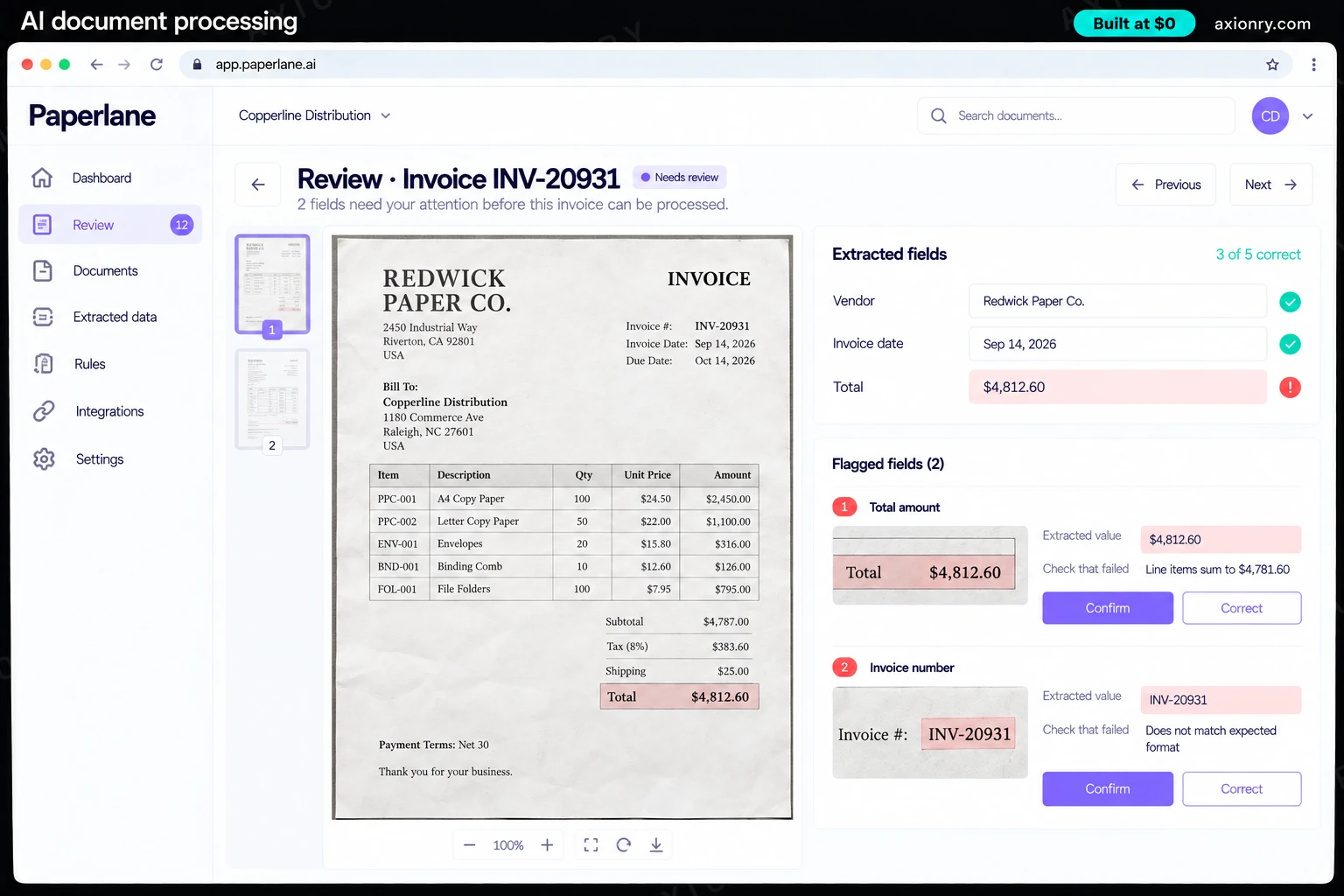
A queue sorted by amount at risk, showing each doubtful field beside a crop of exactly where it came from, confirmed with a keystroke.
Each document's original file, extracted values, checks, corrections and reviewer kept together for audits and disputes.
What features does an AI document processing pipeline need?
An AI document processing pipeline needs 8 core features: intake from anywhere, classifies and splits, cheapest reader that works, fields in your format, arithmetic and record checks, review built for speed, export without duplicates and learns from corrections.
Intake from anywhere
Email inboxes, uploads, SFTP drops and scanners feed one queue, and a file that arrives twice is caught by its fingerprint.
Classifies and splits
It recognizes invoices, receipts, IDs, statements and contracts, and splits a scan of thirty invoices into thirty documents.
Cheapest reader that works
Digital PDFs are read from their text layer for free, clean scans go to OCR, and messy tables or handwriting go to a vision model.
Fields in your format
Each document type has a typed schema, and every extracted value records the page and position it came from.
Arithmetic and record checks
Line items must sum to the total, tax must reconcile, dates must be in order and the vendor must exist in your records.
Review built for speed
Only flagged fields are shown, beside a crop of the source, ordered by amount and due date, with keyboard shortcuts.
Export without duplicates
Records post to QuickBooks, Xero or your own system with a key per document, so a retry never creates a second bill.
Learns from corrections
Every correction is logged by field and vendor and becomes an example that improves the next document from that supplier.
What screens does an AI document processing pipeline have?
It is built around 3 screens: document inbox, review and exported record.
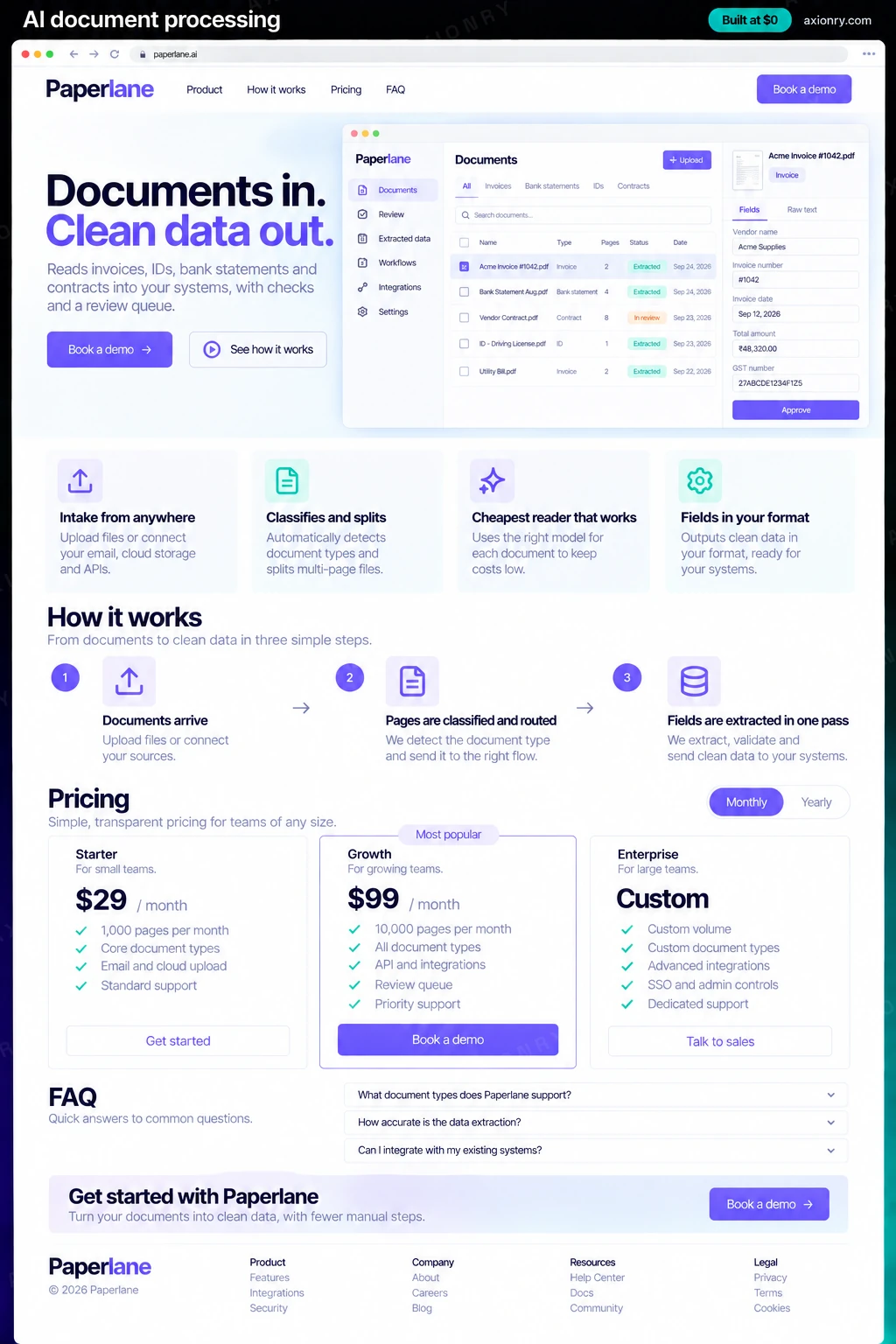
- 1Document inboxToday's documents by type and status: received, approved automatically, in review and exported.
- 2ReviewAn invoice with two flagged fields, each beside a crop of the original, the check that failed, and confirm or correct buttons.
- 3Exported recordThe finished invoice record with vendor, number, dates and total, posted to accounting.
How does an AI document processing pipeline work?
End to end, in 5 steps: documents arrive, pages are classified and routed, fields are extracted in one pass, rules check the result and reviewed, exported, remembered.
- 1
Documents arrive
Attachments from a shared inbox, uploads and SFTP drops land in one queue. Each file is fingerprinted, so a supplier's resend or a forwarded copy is recognized as a duplicate.
- 2
Pages are classified and routed
The first page decides the document type and where a multi-document scan should be split. Each page then goes to the cheapest reader that works: text layer, OCR or a vision model.
- 3
Fields are extracted in one pass
A model reads the whole document at once, so line items that run across pages stay together, and fills a typed schema with a page and position for every value.
- 4
Rules check the result
Arithmetic, tax, date and vendor checks run in plain code. Documents that pass go straight through; a failed check or an unknown vendor sends the document to review.
- 5
Reviewed, exported, remembered
A reviewer confirms or corrects only the flagged fields. The record posts to accounting once, and each correction is saved to improve that vendor's next document.
What is the architecture and tech stack of an AI document processing pipeline?
It has 8 layers: intake and storage (Amazon SES or Postmark inbound email, S3 for originals), queue (SQS or BullMQ workers), reading pages (Text layer first with pdfplumber, Amazon Textract or Azure Document Intelligence for scans), classification and extraction (Gemini 3.7 Flash, with Claude Sonnet 5 for hard documents), validation (Plain code: sums, tax, dates, vendor master lookup), review app (Next.js with page crops and keyboard shortcuts), export (QuickBooks Online or Xero API, or your ERP) and data and audit (Postgres for records, checks and corrections). The diagram shows how a request moves through them.
| Layer | What we use | Why |
|---|---|---|
| Intake and storage | Amazon SES or Postmark inbound email, S3 for originals | Every original is stored once, unchanged and fingerprinted, so duplicates are caught before anyone pays twice. |
| Queue | SQS or BullMQ workers | Month-end brings hundreds of documents in an hour; a queue absorbs the spike and retries failures. |
| Reading pages | Text layer first with pdfplumber, Amazon Textract or Azure Document Intelligence for scans | Most business PDFs have a text layer and cost nothing to read, so OCR is kept for real scans. |
| Classification and extraction | Gemini 3.7 Flash, with Claude Sonnet 5 for hard documents | A fast vision model reads layout and tables in one pass, and the stronger model is a second try on failures. |
| Validation | Plain code: sums, tax, dates, vendor master lookup | Arithmetic catches errors a model's own confidence score never will, and it costs nothing to run. |
| Review app | Next.js with page crops and keyboard shortcuts | Reviewer time is most of the running cost, so the screen is built for seconds per field. |
| Export | QuickBooks Online or Xero API, or your ERP | Records post once with an idempotency key, and the receipt is stored against the document. |
| Data and audit | Postgres for records, checks and corrections | One row per page and per correction answers what happened to any document, and supplies examples for the next version. |
How much does it cost to build an AI document processing pipeline?
A launch-ready AI document processing costs $21,500 to $44,500 to build and takes 6 to 10 weeks. A clickable demo costs $2,600 to $5,500 (2 to 4 weeks), and running it costs $190 to $620 a month at the usage below. You start at $0 and pay per checkpoint you accept.
Priced with the same model as our AI product cost estimator, from the features above. Your price is fixed in writing after a 20-minute call, before any work starts.
| Version | Build cost | Timeline | What it is |
|---|---|---|---|
| Clickable demo | $2,600 to $5,500 | 2 to 4 weeks | Clickable and real where it matters, on test data. Built to show users and investors, not to carry production traffic, so compliance work starts at launch. |
| Launch-ready | $21,500 to $44,500 | 6 to 10 weeks | Production architecture, tests on the risky paths, monitoring, and a handover your team can run. |
| Enterprise-grade | $28,000 to $58,000 | 7 to 12 weeks | Load tested, highly available, audited and documented for a larger team. |
What it costs to run
About 15,000 documents a month of around three pages each, read by Gemini 3.7 Flash, plus hosting; OCR on scanned pages and reviewer time are extra.
| Line | Per month | Assumes |
|---|---|---|
| Hosting and database | $45 to $120 | Vercel + managed services, sized for 250 monthly users |
| Model usage | $140 to $350 | Gemini 3.7 Flash, 250 requests per user a month |
| Email, monitoring, analytics | $0 to $150 | Free tiers cover most products at launch |
| Total | $190 to $620 | List prices, before any volume discount |
Build at $0: how you pay
$0 is when you pay, not what you pay. The launch-ready build is split into checkpoints with acceptance criteria agreed before work starts, and each one is invoiced only after you have seen it and accepted it.
- 1Scope and acceptance criteriaBefore work startsA call, then a written plan: every checkpoint with acceptance criteria you agree to before work starts.$0
- 2Architecture and first flowBy week 2Data model, service boundaries and one real flow working end to end.$4,300 to $9,000
- 3Core productBy week 5The main flows on production architecture, with a demo at the end of every week.$6,500 to $13,500
- 4AI on your real dataBy week 8Models, agents or voice working on real inputs, with evals and guardrails in place.$6,500 to $13,500
- 5Launch and handoverBy week 10Deployed on your accounts and documented, with 30 days of defect correction included.$4,300 to $9,000
What can you add to an AI document processing pipeline after launch?
The additions most teams make next: match to purchase orders, fraud and anomaly checks, search across your documents and sell it as a service.
Match to purchase orders
Two- and three-way matching against purchase orders and receipts, with mismatches sent to whoever raised the order.
Fraud and anomaly checks
Flag changed bank details, duplicate invoice numbers across vendors and amounts far outside a supplier's usual range.
Search across your documents
Ask questions across contracts and statements and get cited answers, built on the text the pipeline already extracted.
Sell it as a service
Offer extraction to accounting firms or lenders, with a workspace and schema per client and billing by the page.
What are the risks when building an AI document processing pipeline?
Three things decide whether it works in production: wrong numbers that look right, sensitive data in every file and paying the same invoice twice.
Wrong numbers that look right
A transposed digit or a shifted table column passes a schema check. Validate totals, tax and dates in code, send tables that matter to the vision path, and sample auto-approved documents for review every week.
Sensitive data in every file
IDs, bank details and contracts carry personal data under GDPR, GLBA or CCPA. Choose model API terms that exclude training on your inputs, keep page images out of long-lived logs, and enforce retention with a scheduled job.
Paying the same invoice twice
The same invoice arrives by email, then again as a rescan. Fingerprint files at intake, compare vendor, number and amount after extraction, and export with a key per document so retries never post twice.