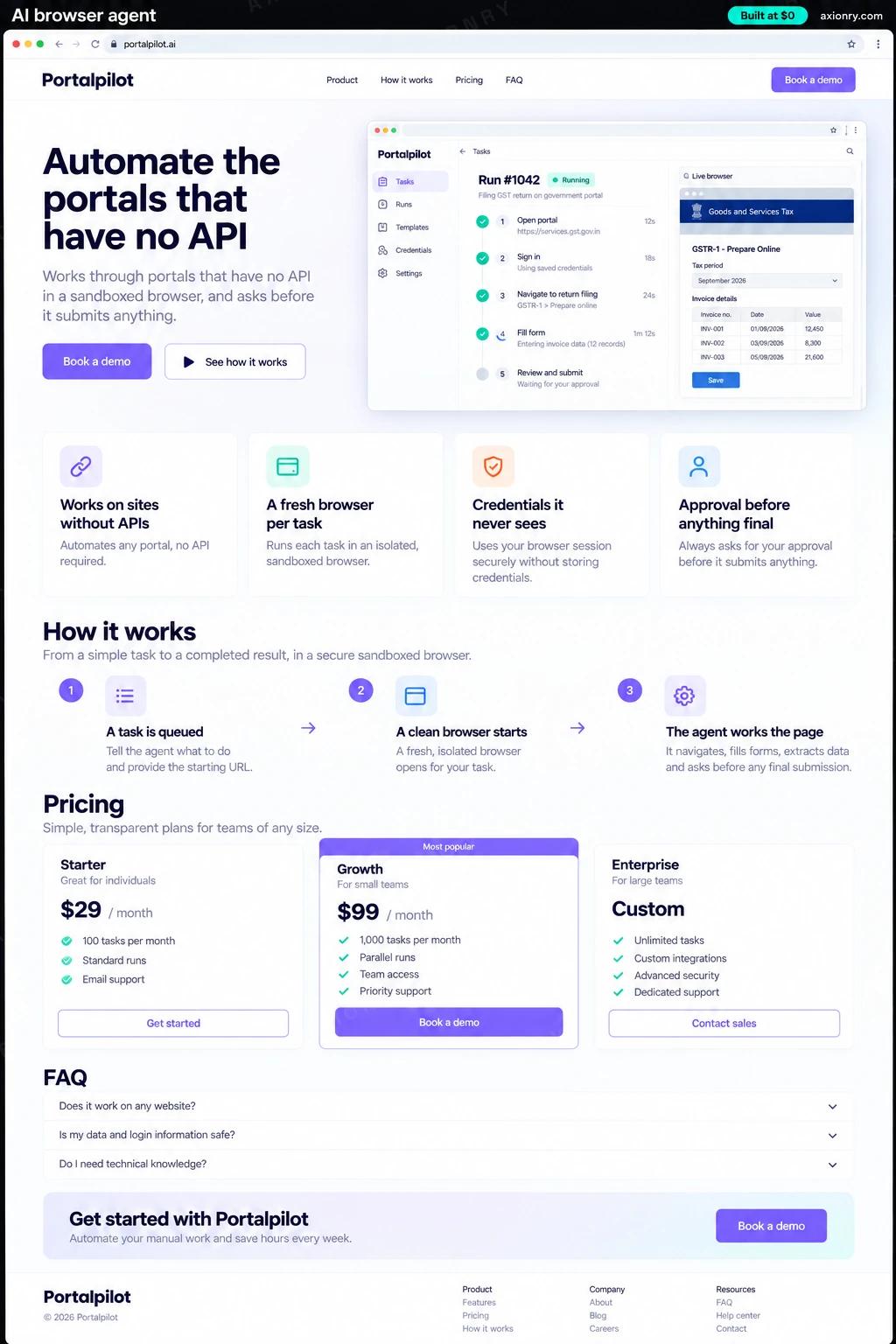
What is an AI browser agent?
An AI browser agent is software that uses a website the way a person does: it opens a browser, logs in, reads the page, clicks, types and downloads files. It is for work stuck in portals that offer no API, and it runs in an isolated browser that holds only the access one task needs.
It fits operations teams who spend hours each week inside other companies' websites: downloading invoices from supplier portals, checking claim status on insurer sites, filing the same form on a government portal, updating bookings on a carrier's screens. The work is repetitive and rule-bound but still needs care, which is why the agent reads first, prepares everything, and asks a person before any step that submits, pays or cannot be undone.
Build it for your own operations, or as a product that runs portal workflows for your customers. This page prices one business's agent with two or three portal workflows, a task queue, approvals and session recordings. One rule before you build: if the site's owner offers an API or a data export, use that instead, because it is cheaper and far more reliable than driving a browser.
Portal chores done overnight: invoices downloaded and filed, statuses checked, forms filled and waiting for one final click.
A plain summary of what the agent is about to submit, a screenshot of the filled form, and approve or reject in one tap.
A fresh isolated browser per task, credentials in a vault the model never sees, allowlisted sites only, and a recording of every session.
What features does an AI browser agent need?
An AI browser agent needs 8 core features: works on sites without APIs, a fresh browser per task, credentials it never sees, approval before anything final, allowlisted sites only, reads what it downloads, scheduled and on-demand runs and recordings of every session.
Works on sites without APIs
Logs in, navigates, searches, fills forms and downloads files on portals built for people, including older ones with frames and pop-ups.
A fresh browser per task
Each run gets a sandboxed browser that is destroyed afterwards, so one task's cookies, files and mistakes never reach another.
Credentials it never sees
Passwords and one-time codes are filled in by the harness from a vault, not typed by the model, so they never enter a prompt or a log.
Approval before anything final
Submit, pay, delete and send steps stop and show the approver the filled form and a summary before anything irreversible happens.
Allowlisted sites only
The browser can reach only the portals each workflow needs, which limits what a malicious page or link can do.
Reads what it downloads
Invoices and statements it collects are read into fields such as amount, date and reference, and filed where your team expects them.
Scheduled and on-demand runs
Nightly invoice pulls, weekly status checks, or a run started from the queue when someone needs a form filed today.
Recordings of every session
Screenshots, actions and page text are kept for each run, so a failed step can be watched, fixed and tried again.
What screens does an AI browser agent have?
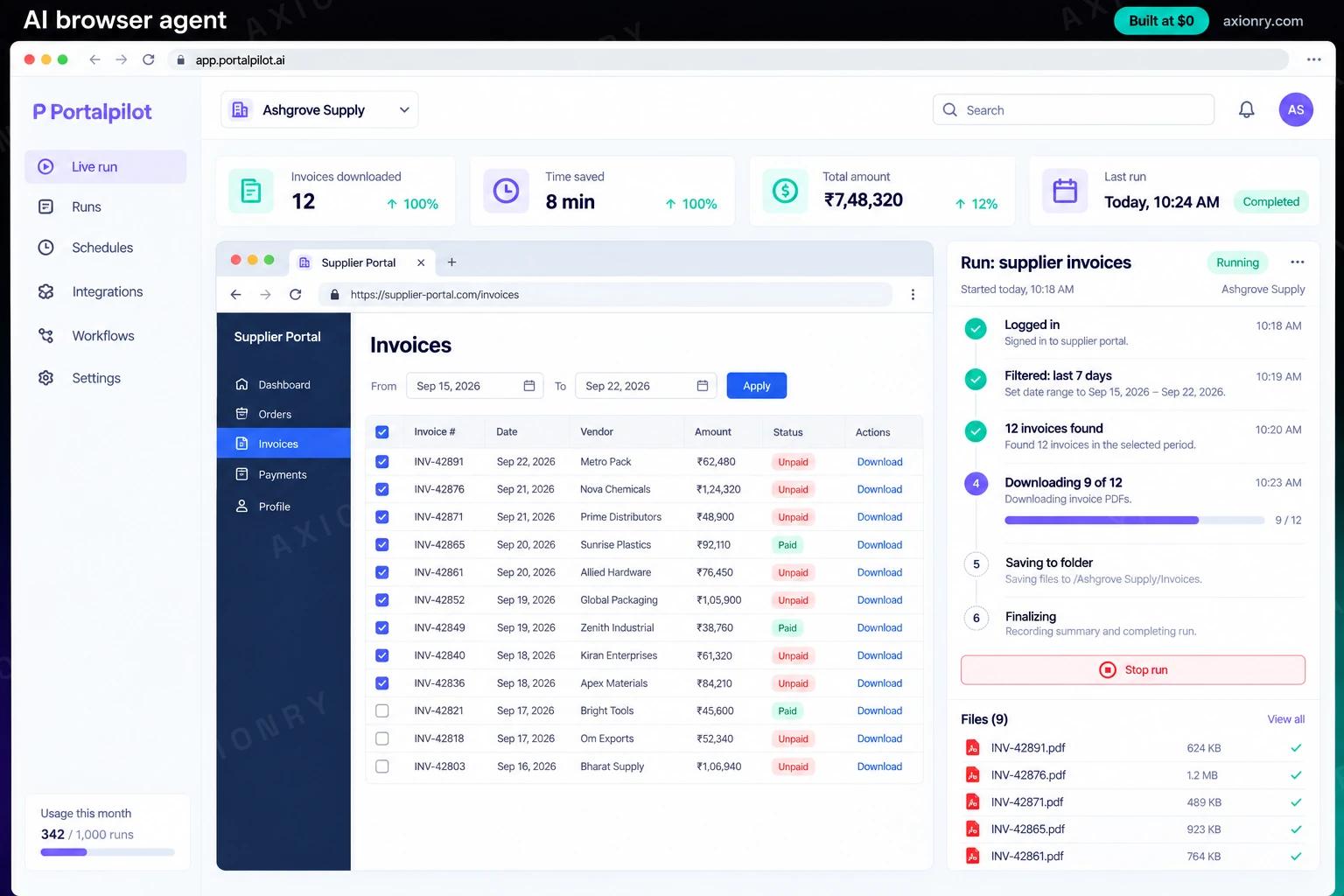
It is built around 3 screens: live run, approval request and tonight's queue.
- 1Live runThe sandboxed browser on a supplier portal beside the agent's step list: logged in, filtered by date, 12 invoices found, downloading.
- 2Approval requestA filled claim form ready to submit, with the claim number, amount and portal, and approve or reject buttons.
- 3Tonight's queueThe night's portal tasks by type, and the runs that need a person.
How does an AI browser agent work?
End to end, in 5 steps: a task is queued, a clean browser starts, the agent works the page, it stops before final steps and results are filed and logged.
- 1
A task is queued
A schedule, a form or an email starts a run, such as 'download last week's invoices from the supplier portal'. Each workflow has its allowed sites, steps and approval rules written down.
- 2
A clean browser starts
The harness starts a fresh isolated browser, fills the login from the vault, and gives the agent the page text and a screenshot, never the password.
- 3
The agent works the page
It reads the page, picks the next action and checks the result after each click. If the page changed or shows an error, it tries another way or stops and asks for help.
- 4
It stops before final steps
Anything that submits, pays or deletes pauses. The approver sees the filled form and a summary, and approves or rejects from the console or a phone.
- 5
Results are filed and logged
Downloaded files are read into fields and stored where your team works. The recording, steps and outcome are kept, and the browser is destroyed.
What is the architecture and tech stack of an AI browser agent?
It has 7 layers: browser automation (Playwright driving Chromium, or Browserbase for hosted browsers), isolation (One container per run on AWS Fargate, or Firecracker microVMs), agent model (Claude Sonnet 5 with the computer use tool), workflow runner (Temporal or Inngest), secrets (AWS Secrets Manager or HashiCorp Vault), extraction (Gemini 3.7 Flash with a typed schema) and console and storage (Next.js console, Postgres, recordings in S3). The diagram shows how a request moves through them.
| Layer | What we use | Why |
|---|---|---|
| Browser automation | Playwright driving Chromium, or Browserbase for hosted browsers | Playwright drives a real browser and records a trace of every run; hosted browsers save you running the fleet yourself. |
| Isolation | One container per run on AWS Fargate, or Firecracker microVMs | A fresh browser per task means no cookies, downloads or injected scripts carry over between runs. |
| Agent model | Claude Sonnet 5 with the computer use tool | It reads screenshots and page text, so it copes with portals whose layout shifts, and it is used only for steps that need judgment. |
| Workflow runner | Temporal or Inngest | Runs pause for approvals that may wait hours, then resume at the right step without redoing earlier ones. |
| Secrets | AWS Secrets Manager or HashiCorp Vault | Logins and one-time codes are injected into the page by the harness and never enter the model's context. |
| Extraction | Gemini 3.7 Flash with a typed schema | Turning downloaded invoices into fields is a cheap, separate step with its own checks, not the browser model's job. |
| Console and storage | Next.js console, Postgres, recordings in S3 | The queue, approvals and every session's screenshots in one place your team and auditors can open. |
How much does it cost to build an AI browser agent?
A launch-ready AI browser agent costs $28,500 to $59,500 to build and takes 7 to 13 weeks. A clickable demo costs $3,400 to $7,000 (2 to 5 weeks), and running it costs $810 to $2,300 a month at the usage below. You start at $0 and pay per checkpoint you accept.
Priced with the same model as our AI product cost estimator, from the features above. Your price is fixed in writing after a 20-minute call, before any work starts.
| Version | Build cost | Timeline | What it is |
|---|---|---|---|
| Clickable demo | $3,400 to $7,000 | 2 to 5 weeks | Clickable and real where it matters, on test data. Built to show users and investors, not to carry production traffic, so compliance work starts at launch. |
| Launch-ready | $28,500 to $59,500 | 7 to 13 weeks | Production architecture, tests on the risky paths, monitoring, and a handover your team can run. |
| Enterprise-grade | $37,000 to $77,000 | 9 to 15 weeks | Load tested, highly available, audited and documented for a larger team. |
What it costs to run
About 2,000 portal tasks a month of 15 to 20 browser steps each on Claude Sonnet 5, plus browser containers and hosting in your AWS account.
| Line | Per month | Assumes |
|---|---|---|
| Hosting and database | $60 to $250 | AWS, sized for 100 monthly users |
| Model usage | $750 to $1,900 | Claude Sonnet 5, 250 requests per user a month |
| Email, monitoring, analytics | $0 to $150 | Free tiers cover most products at launch |
| Total | $810 to $2,300 | List prices, before any volume discount |
Build at $0: how you pay
$0 is when you pay, not what you pay. The launch-ready build is split into checkpoints with acceptance criteria agreed before work starts, and each one is invoiced only after you have seen it and accepted it.
- 1Scope and acceptance criteriaBefore work startsA call, then a written plan: every checkpoint with acceptance criteria you agree to before work starts.$0
- 2Architecture and first flowBy week 3Data model, service boundaries and one real flow working end to end.$5,500 to $12,000
- 3Core productBy week 7The main flows on production architecture, with a demo at the end of every week.$8,500 to $18,000
- 4AI on your real dataBy week 10Models, agents or voice working on real inputs, with evals and guardrails in place.$8,500 to $18,000
- 5Launch and handoverBy week 13Deployed on your accounts and documented, with 30 days of defect correction included.$5,500 to $12,000
What can you add to an AI browser agent after launch?
The additions most teams make next: switch to an API later, more portals and workflows, reconcile what it collects and run it for your customers.
Switch to an API later
When a portal owner offers an API or an export, the workflow moves to it and keeps your queue, approvals and logs.
More portals and workflows
Each new site or form becomes its own workflow with its own tests and approval rules, added one checkpoint at a time.
Reconcile what it collects
Match downloaded invoices against purchase orders and payments, and flag differences for your finance team.
Run it for your customers
Offer portal work as a service, with a separate vault and queue for each customer and a bill for the tasks run.
What are the risks when building an AI browser agent?
Three things decide whether it works in production: web pages can carry instructions, terms of use and consent and portals change without notice.
Web pages can carry instructions
Any page the agent reads can hide text telling it to do something else, and no browser agent is immune to prompt injection. Keep it on allowlisted sites, give it no credential worth stealing, and require approval before anything that submits or pays.
Terms of use and consent
Some sites forbid automated access in their terms, and many expect the account holder to authorize it. Check each portal's terms, use your own accounts, and keep a record of who approved each submission.
Portals change without notice
A redesigned login page or a new cookie banner breaks runs quietly. Test each workflow daily against the live site, alert when a step's success rate drops, and keep recordings so a broken step can be seen and fixed quickly.