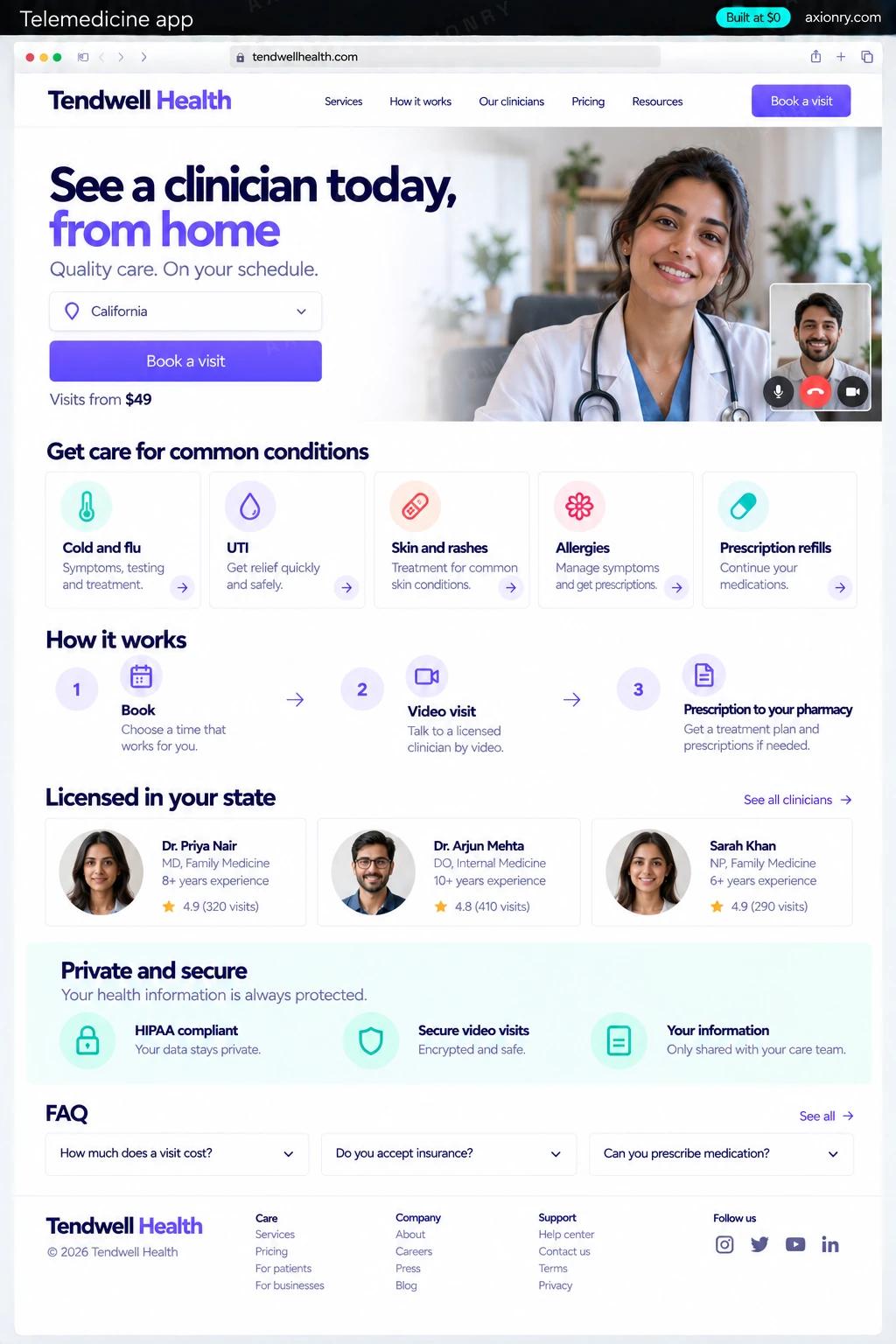
What is a telemedicine app?
A telemedicine app lets patients see a clinician without visiting a clinic. The patient books a slot, completes intake and consent, pays, and joins a video visit; the clinician reviews the history, writes a note, and sends any prescription electronically to the patient's pharmacy.
It is for practices adding virtual visits, virtual-first clinics in areas like mental health, dermatology or weight care, and founders building a cash-pay telehealth brand. Its value is reach and utilization: clinicians can see patients anywhere in the states where they are licensed, fill gaps in the schedule, and follow up without an office visit.
A clinic can build it for its own clinicians, or a founder can run a telehealth brand with contracted clinicians. This page prices a cash-pay app for one organization: a patient mobile app, a clinician web app, an admin and HIPAA controls. Insurance billing and EHR integration are later steps.
Books a visit in a few taps, pays by card, joins video from the app and finds prescriptions, notes and receipts afterwards.
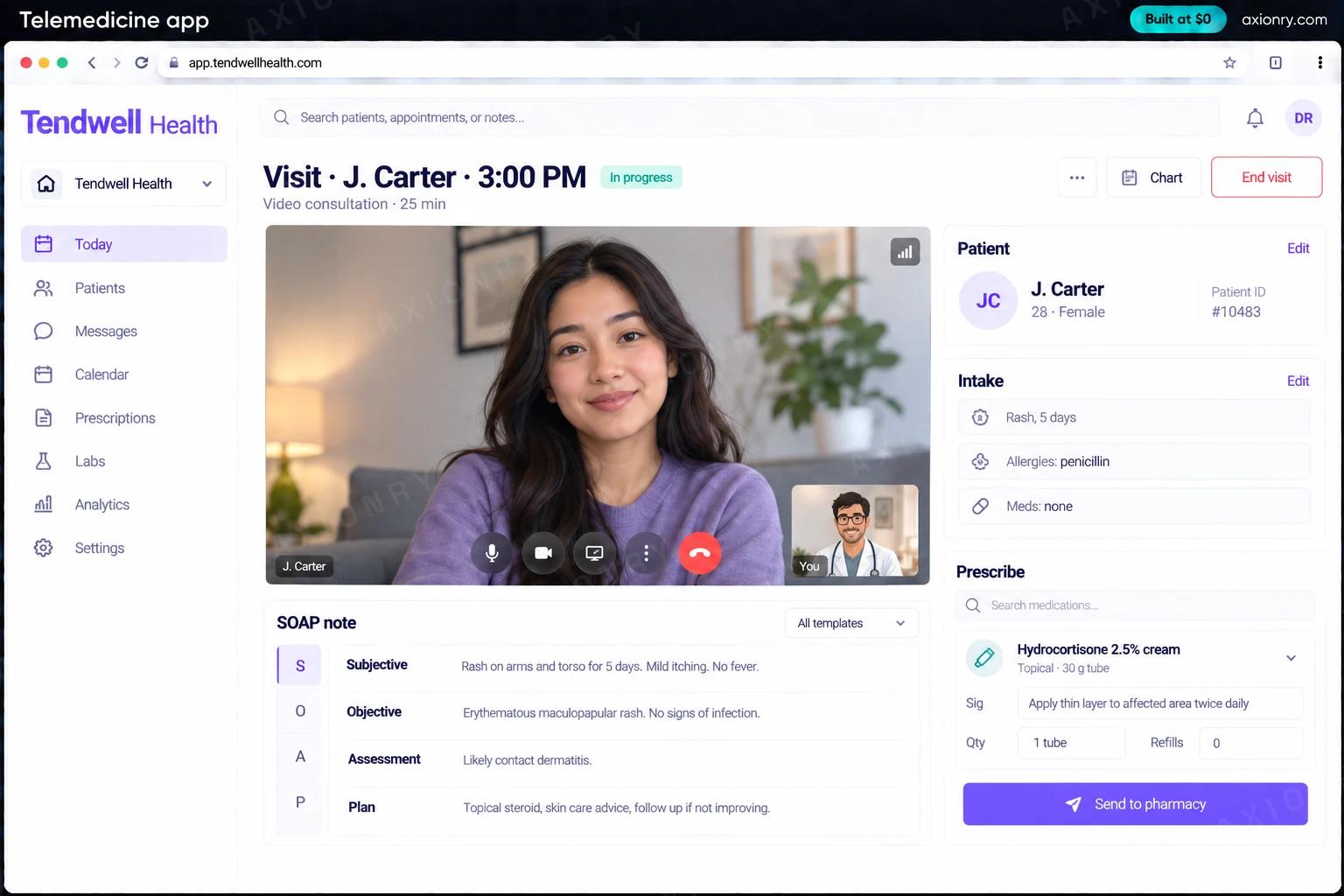
A day view of visits, the patient's intake and history before joining, a note template and e-prescribing on the same screen.
Schedules, state licenses, payments, refunds and an access log that answers who opened which record.
What features does a telemedicine app need?
A telemedicine app needs 8 core features: booking by state license, intake and consent, HIPAA-ready video visits, prescriptions to the pharmacy, visit notes, pay after the visit, patient records and discreet reminders.
Booking by state license
Patients see only clinicians licensed in the state they are in, with real availability shown in their own time zone.
Intake and consent
Symptoms, history, medications, allergies and a telehealth consent form completed before the visit, with photo uploads where they help.
HIPAA-ready video visits
A waiting room and one-to-one video on LiveKit or Daily, not recorded by default, that drops to audio when the connection weakens.
Prescriptions to the pharmacy
Prescriptions sent to the patient's chosen pharmacy through DoseSpot, a Surescripts-certified service, from inside the visit.
Visit notes
SOAP note templates, signed and locked at the end of the visit, with any later addendum tracked.
Pay after the visit
A card saved at booking through Stripe and charged when the visit is complete, with refunds and memberships.
Patient records
Visits, notes, prescriptions, documents and receipts in one record the patient can view and download.
Discreet reminders
Appointment reminders by push and SMS that carry the time and a link, never the reason for the visit.
What screens does a telemedicine app have?
It is built around 3 screens: book a visit, visit room and after the visit.
- 1Book a visitThe patient's phone: clinicians licensed in their state, open slots, the price and a book and pay button.
- 2Visit roomThe clinician's laptop: the video, the intake summary, the SOAP note and the prescription panel together.
- 3After the visitThe prescription confirmation from the pharmacy and the paid receipt.
How does a telemedicine app work?
End to end, in 5 steps: the patient books, the visit starts, the clinician documents and prescribes, payment and follow-up and everything is logged.
- 1
The patient books
They confirm the state they are in, pick a licensed clinician and a slot, complete intake and consent, and save a card. Nothing is charged yet.
- 2
The visit starts
At the appointment time both join a private video room; the clinician sees intake and history beside the video, and the call drops to audio if the connection is poor.
- 3
The clinician documents and prescribes
The note is written during the visit from a template, and a prescription goes to the patient's pharmacy through the e-prescribing service without leaving the screen.
- 4
Payment and follow-up
The card is charged when the visit is complete, a receipt goes out, and follow-up instructions appear in the patient's record.
- 5
Everything is logged
Each view of a record, each note and each prescription is written to the audit log, and the note is locked once signed.
What is the architecture and tech stack of a telemedicine app?
It has 8 layers: video (LiveKit self-hosted on AWS, or Daily with a signed BAA), patient app (React Native with Expo), clinician and admin app (Next.js on AWS), backend and data (Node.js, Postgres on Amazon RDS, documents in S3), e-prescribing (DoseSpot), payments (Stripe), messaging (Twilio SMS under a BAA, Paubox for email) and security (Role-based access, an audit log, AWS CloudTrail). The diagram shows how a request moves through them.
| Layer | What we use | Why |
|---|---|---|
| Video | LiveKit self-hosted on AWS, or Daily with a signed BAA | Encrypted one-to-one video; LiveKit runs inside your own AWS account under the AWS BAA, and Daily is managed for you. |
| Patient app | React Native with Expo | iOS and Android from one codebase, with the camera and microphone access video visits need. |
| Clinician and admin app | Next.js on AWS | Clinicians work on laptops, and keeping the whole stack on AWS keeps it under one BAA. |
| Backend and data | Node.js, Postgres on Amazon RDS, documents in S3 | HIPAA-eligible AWS services, encrypted at rest and in transit. |
| E-prescribing | DoseSpot | An embeddable, Surescripts-certified prescribing service, so you do not certify a prescribing module yourself. |
| Payments | Stripe | Card saved at booking and charged after the visit, with no diagnosis or visit reason in payment data. |
| Messaging | Twilio SMS under a BAA, Paubox for email | Reminders carry the time and a link; anything clinical stays inside the app. |
| Security | Role-based access, an audit log, AWS CloudTrail | Every access to a record is attributable, which HIPAA's audit controls standard expects. |
How much does it cost to build a telemedicine app?
A launch-ready telemedicine app costs $32,000 to $64,500 to build and takes 8 to 13 weeks. A clickable demo costs $3,300 to $6,500 (2 to 5 weeks), and running it costs $60 to $400 a month at the usage below. You start at $0 and pay per checkpoint you accept.
Priced with the same model as our AI product cost estimator, from the features above. Your price is fixed in writing after a 20-minute call, before any work starts.
| Version | Build cost | Timeline | What it is |
|---|---|---|---|
| Clickable demo | $3,300 to $6,500 | 2 to 5 weeks | Clickable and real where it matters, on test data. Built to show users and investors, not to carry production traffic, so compliance work starts at launch. |
| Launch-ready | $32,000 to $64,500 | 8 to 13 weeks | Production architecture, tests on the risky paths, monitoring, and a handover your team can run. |
| Enterprise-grade | $40,500 to $81,500 | 9 to 16 weeks | Load tested, highly available, audited and documented for a larger team. |
What it costs to run
About 1,000 patients a month on HIPAA-eligible AWS services; video minutes, e-prescribing, SMS and card fees are billed by those vendors on top.
| Line | Per month | Assumes |
|---|---|---|
| Hosting and database | $60 to $250 | AWS, sized for 1,000 monthly users |
| Email, monitoring, analytics | $0 to $150 | Free tiers cover most products at launch |
| Total | $60 to $400 | List prices, before any volume discount |
Build at $0: how you pay
$0 is when you pay, not what you pay. The launch-ready build is split into checkpoints with acceptance criteria agreed before work starts, and each one is invoiced only after you have seen it and accepted it.
- 1Scope and acceptance criteriaBefore work startsA call, then a written plan: every checkpoint with acceptance criteria you agree to before work starts.$0
- 2Architecture and first flowBy week 3Data model, service boundaries and one real flow working end to end.$6,500 to $13,000
- 3Core productBy week 7The main flows on production architecture, with a demo at the end of every week.$9,500 to $19,500
- 4The rest of v1By week 10Billing, admin and the flows that let you charge money and support users.$9,500 to $19,500
- 5Launch and handoverBy week 13Deployed on your accounts and documented, with 30 days of defect correction included.$6,500 to $13,000
What can you add to a telemedicine app after launch?
The additions most teams make next: an AI scribe, intake summaries, no-show prediction and message triage.
An AI scribe
Drafts the SOAP note from the visit conversation, with the patient's consent, for the clinician to review and sign.
Intake summaries
Turns a long intake form and uploaded records into a short brief the clinician reads before joining.
No-show prediction
Flags visits likely to be missed and offers those slots to a waitlist or sends an extra reminder.
Message triage
Answers scheduling and billing questions from the clinic's own policies and routes anything clinical to a nurse.
What are the risks when building a telemedicine app?
Three things decide whether it works in production: HIPAA and a BAA with every vendor, licensing and prescribing rules and visits on bad connections.
HIPAA and a BAA with every vendor
Every vendor that stores or transmits patient data, from hosting and video to SMS and email, must sign a business associate agreement. Choose HIPAA-eligible services, keep analytics free of health data, and keep diagnoses out of payment descriptions.
Licensing and prescribing rules
A clinician may generally treat a patient only in states where they are licensed, based on where the patient is during the visit. Controlled substances follow DEA telemedicine rules that have changed several times since 2020, so leave them out of v1 unless your counsel approves.
Visits on bad connections
Visits fail on weak signal and old phones. Test on real devices and networks, fall back to audio, give clinicians a way to call the patient's phone as a last resort, and track failed visits as closely as revenue.