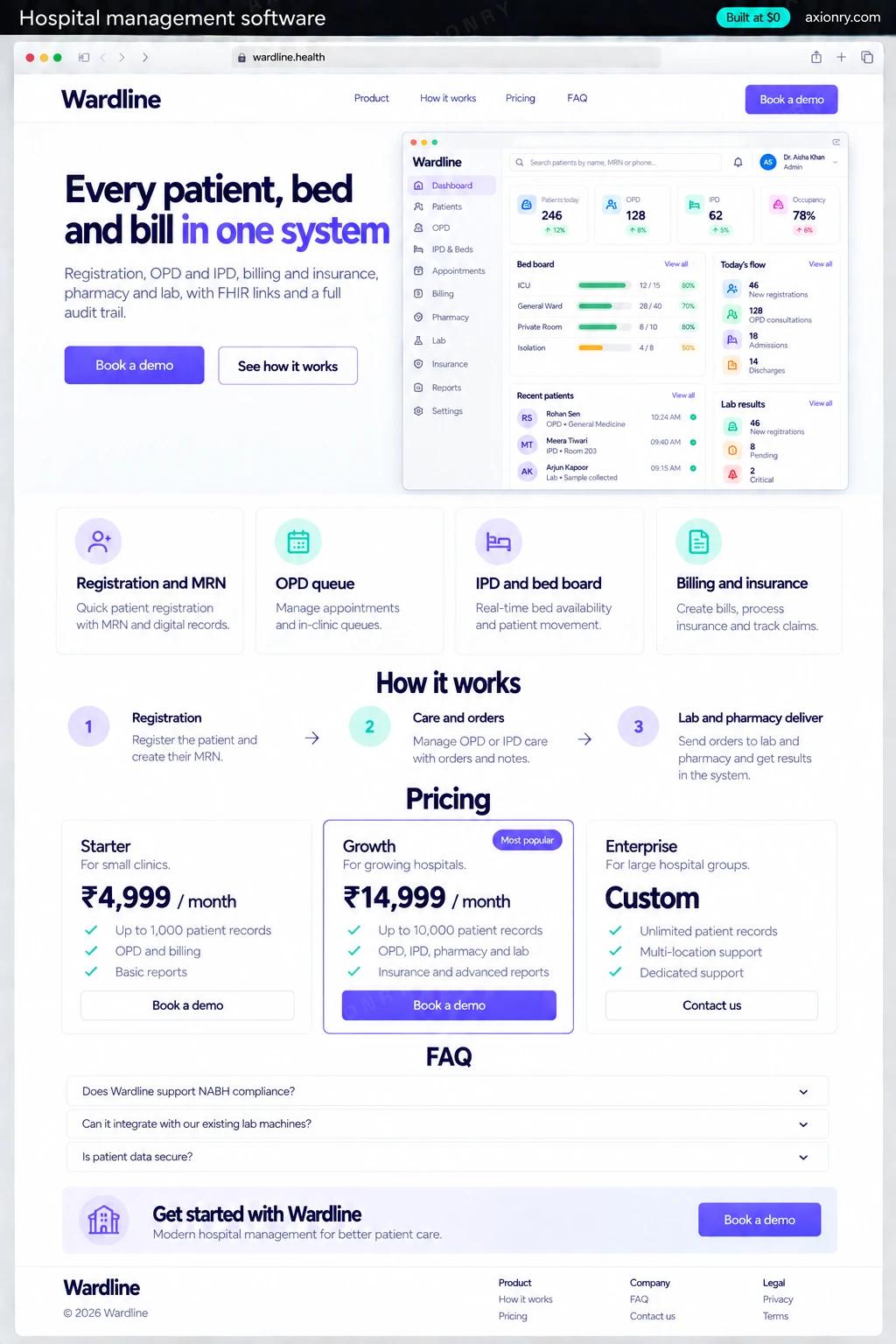
What is hospital management software?
Hospital management software (an HMS) records everything that happens to a patient in a hospital and everything it is billed for. It registers patients, runs outpatient queues and inpatient admissions, manages beds, orders lab tests and medicines, and produces bills and insurance claims, with each department seeing only what its role requires.
It is for small and mid-size hospitals, specialty hospitals and clinic chains, and for founders selling to them in markets where the large EHR suites are out of reach. The value is revenue that stops leaking because every test, bed-day and medicine is billed, fewer hours on paper registers, and a record that follows the patient between departments.
A hospital or group can commission it for itself, or a founder can build it as a product for many hospitals. This page prices one hospital's system: a web app for every department, role-based access, an audit log, HIPAA controls, one FHIR connection to an EHR and migration from your current system. A patient app and a multi-hospital rollout come later.
Registration in one screen with duplicate checks, a running bill per admission, deposits, insurance approvals and claims, and a clean discharge bill.
Today's OPD queue, the inpatient list by ward, lab and pharmacy orders, notes and vitals, and results as soon as they are verified.
Bed occupancy, revenue by department, pending claims and stock alerts, and an audit trail of who opened which record.
What features does your hospital management software need?
Your hospital management software needs 8 core features: registration and MRN, OPD queue, IPD and bed board, billing and insurance, pharmacy stock and dispensing, lab orders and results, FHIR integration and roles and audit.
Registration and MRN
One medical record number per patient, duplicate checks on name, date of birth and phone, and ID and insurance captured at the desk.
OPD queue
Appointments and walk-ins in one token queue per doctor, with consult notes, prescriptions and orders from the same screen.
IPD and bed board
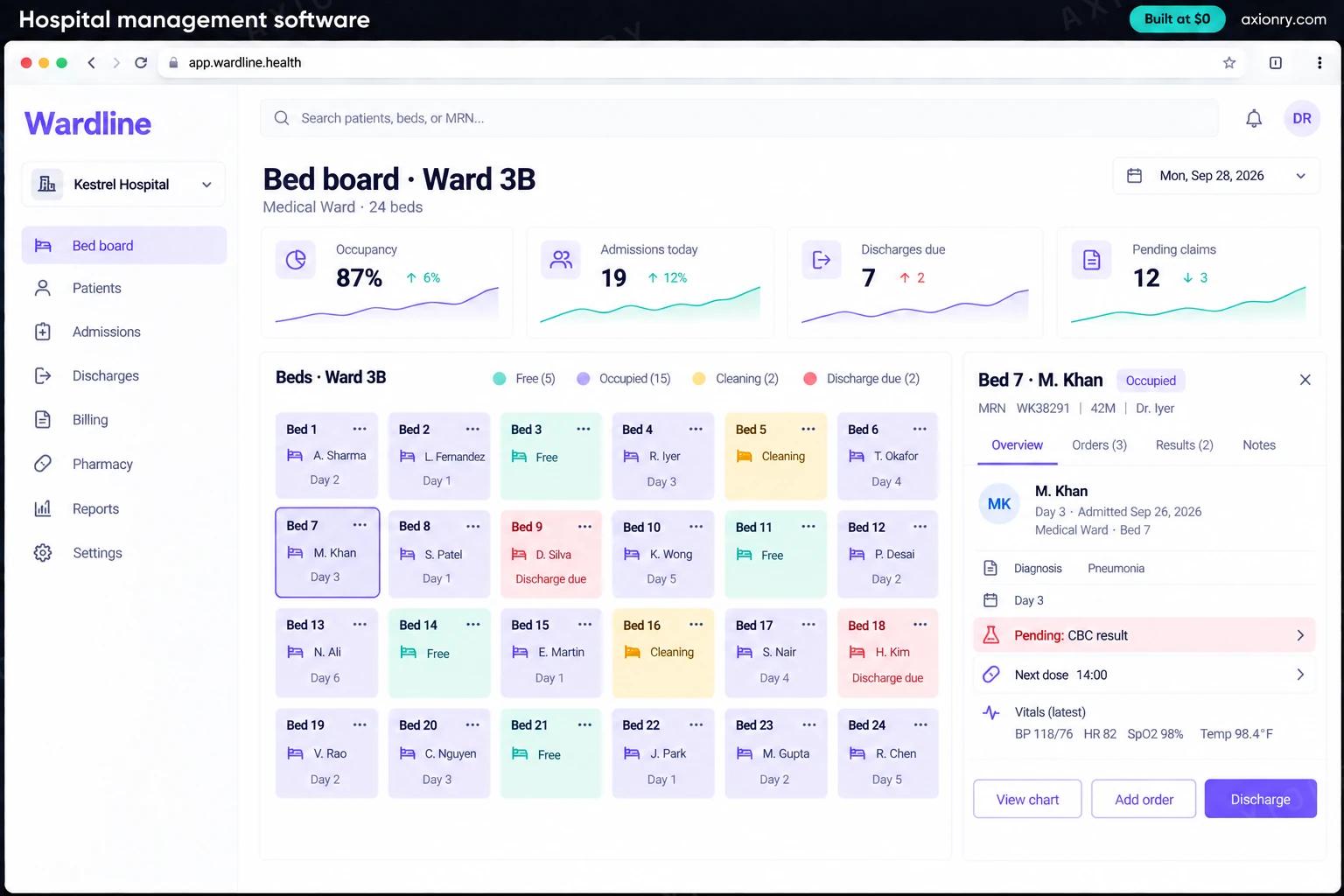
Admissions, transfers and discharges on a live ward and bed view, with nursing notes, vitals and medication charts.
Billing and insurance
Charges captured from orders as they happen, packages and deposits, insurance pre-authorization and claims, and itemized discharge bills.
Pharmacy stock and dispensing
Stock by batch and expiry, dispensing against prescriptions, and alerts before a medicine runs out or expires.
Lab orders and results
Orders with barcoded samples, result entry against reference ranges, verification by a pathologist, and release to the ordering doctor.
FHIR integration
Patient, encounter, lab result and medication data exchanged with an EHR such as Epic or Oracle Health over FHIR R4 APIs.
Roles and audit
Access by role and department, emergency break-the-glass access with a stated reason, and a log of every record viewed or changed.
What screens does your hospital management software have?
It is built around 3 screens: OPD queue, bed board and discharge bill.
- 1OPD queueA doctor's tablet with today's outpatient tokens: who is in consultation, who is waiting and whose vitals are done.
- 2Bed boardOne ward's beds by status, the day's occupancy, admissions, due discharges and pending claims, and one patient's open tasks.
- 3Discharge billRoom, lab and pharmacy charges, the insurer's approved amount and the balance the patient pays.
How does your hospital management software work?
End to end, in 5 steps: registration, care and orders, lab and pharmacy deliver, discharge and billing and records move safely.
- 1
Registration
The front desk searches before creating a record, so a returning patient keeps one MRN. ID and insurance are captured, and an OPD token or an admission is created.
- 2
Care and orders
Doctors see their queue or ward list, write notes, and order tests and medicines. Every order becomes a task for the lab or pharmacy and a charge on the bill.
- 3
Lab and pharmacy deliver
Samples are barcoded, results entered and verified, then released to the doctor; the pharmacy dispenses against the order and stock updates by batch.
- 4
Discharge and billing
The discharge summary is signed, charges are checked against the insurer's approval, and the patient pays the balance or the claim is submitted.
- 5
Records move safely
Summaries and results are shared with the patient's other providers over FHIR, and every access and change is in the audit log.
What is the architecture and tech stack of your hospital management software?
It has 8 layers: web app (Next.js with shadcn/ui, screens by role), backend (Node.js and TypeScript, or Java with Spring Boot), database (Postgres on Amazon RDS, Multi-AZ), live updates (WebSockets with Redis pub/sub), interoperability (FHIR R4 through HAPI FHIR or Medplum, HL7 v2 for lab analyzers), security (Role-based access, break-the-glass logging, AWS KMS encryption), hosting (AWS in your region under the AWS BAA, nightly backups tested by restore) and data migration (Scripts that map, load and verify records from the old system). The diagram shows how a request moves through them.
| Layer | What we use | Why |
|---|---|---|
| Web app | Next.js with shadcn/ui, screens by role | Every department works in a browser on shared terminals, seeing only the screens its role needs. |
| Backend | Node.js and TypeScript, or Java with Spring Boot | A modular monolith with one module per department keeps shared patient data consistent. |
| Database | Postgres on Amazon RDS, Multi-AZ | Strict transactions for billing, and automatic failover so wards are never left without records. |
| Live updates | WebSockets with Redis pub/sub | Bed boards and OPD queues change by the minute and must match on every screen. |
| Interoperability | FHIR R4 through HAPI FHIR or Medplum, HL7 v2 for lab analyzers | FHIR is how current EHRs share data, and many lab instruments still speak HL7 v2 through their middleware. |
| Security | Role-based access, break-the-glass logging, AWS KMS encryption | HIPAA expects access limited by role and every access auditable. |
| Hosting | AWS in your region under the AWS BAA, nightly backups tested by restore | HIPAA-eligible services, and a backup only counts once a restore has worked. |
| Data migration | Scripts that map, load and verify records from the old system | Patients, open bills and stock move over without retyping, and every row is checked. |
How much does it cost to build your hospital management software?
A launch-ready hospital management software costs $33,000 to $71,000 to build and takes 8 to 14 weeks. A clickable demo costs $3,500 to $7,500 (2 to 5 weeks), and running it costs $120 to $690 a month at the usage below. You start at $0 and pay per checkpoint you accept.
Priced with the same model as our AI product cost estimator, from the features above. Your price is fixed in writing after a 20-minute call, before any work starts.
| Version | Build cost | Timeline | What it is |
|---|---|---|---|
| Clickable demo | $3,500 to $7,500 | 2 to 5 weeks | Clickable and real where it matters, on test data. Built to show users and investors, not to carry production traffic, so compliance work starts at launch. |
| Launch-ready | $33,000 to $71,000 | 8 to 14 weeks | Production architecture, tests on the risky paths, monitoring, and a handover your team can run. |
| Enterprise-grade | $42,000 to $89,500 | 9 to 17 weeks | Load tested, highly available, audited and documented for a larger team. |
What it costs to run
One hospital with about 2,500 staff users a month on AWS with a Multi-AZ database; EHR interface, insurance clearinghouse and SMS fees are billed separately.
| Line | Per month | Assumes |
|---|---|---|
| Hosting and database | $100 to $430 | AWS, sized for 2,500 monthly users |
| Email, monitoring, analytics | $20 to $260 | Free tiers cover most products at launch |
| Total | $120 to $690 | List prices, before any volume discount |
Build at $0: how you pay
$0 is when you pay, not what you pay. The launch-ready build is split into checkpoints with acceptance criteria agreed before work starts, and each one is invoiced only after you have seen it and accepted it.
- 1Scope and acceptance criteriaBefore work startsA call, then a written plan: every checkpoint with acceptance criteria you agree to before work starts.$0
- 2Architecture and first flowBy week 3Data model, service boundaries and one real flow working end to end.$6,500 to $14,000
- 3Core productBy week 7The main flows on production architecture, with a demo at the end of every week.$10,000 to $21,500
- 4The rest of v1By week 11Billing, admin and the flows that let you charge money and support users.$10,000 to $21,500
- 5Launch and handoverBy week 14Deployed on your accounts and documented, with 30 days of defect correction included.$6,500 to $14,000
What can you add to your hospital management software after launch?
The additions most teams make next: discharge summary drafts, claim checks before submission, coding suggestions and pharmacy demand forecasts.
Discharge summary drafts
Drafted from the admission's notes, orders and results for the treating doctor to edit and sign.
Claim checks before submission
Compares each claim with the insurer's rules and the clinical notes, and flags what is likely to be denied.
Coding suggestions
Suggests ICD-10 codes from the notes for a coder to confirm or change.
Pharmacy demand forecasts
Predicts demand by medicine and season, so reorders go out before stockouts.
What are the risks when building your hospital management software?
Three things decide whether it works in production: HIPAA and patient privacy, downtime is a clinical risk and billing integrity.
HIPAA and patient privacy
Limit every access by role and log it, with break-the-glass access for emergencies reviewed afterwards. Sign a BAA with each vendor that handles patient data. Outside the US, follow local law, such as India's DPDP Act for personal data.
Downtime is a clinical risk
If the system is down, wards work blind. Run a Multi-AZ database, test restores, keep downtime procedures with printable census and medication lists, and go live one department at a time.
Billing integrity
Missed charges leak revenue and wrong ones invite disputes. Generate charges from orders instead of typing them, lock bills after discharge except through a logged adjustment, and reconcile pharmacy stock against dispensed items every week.