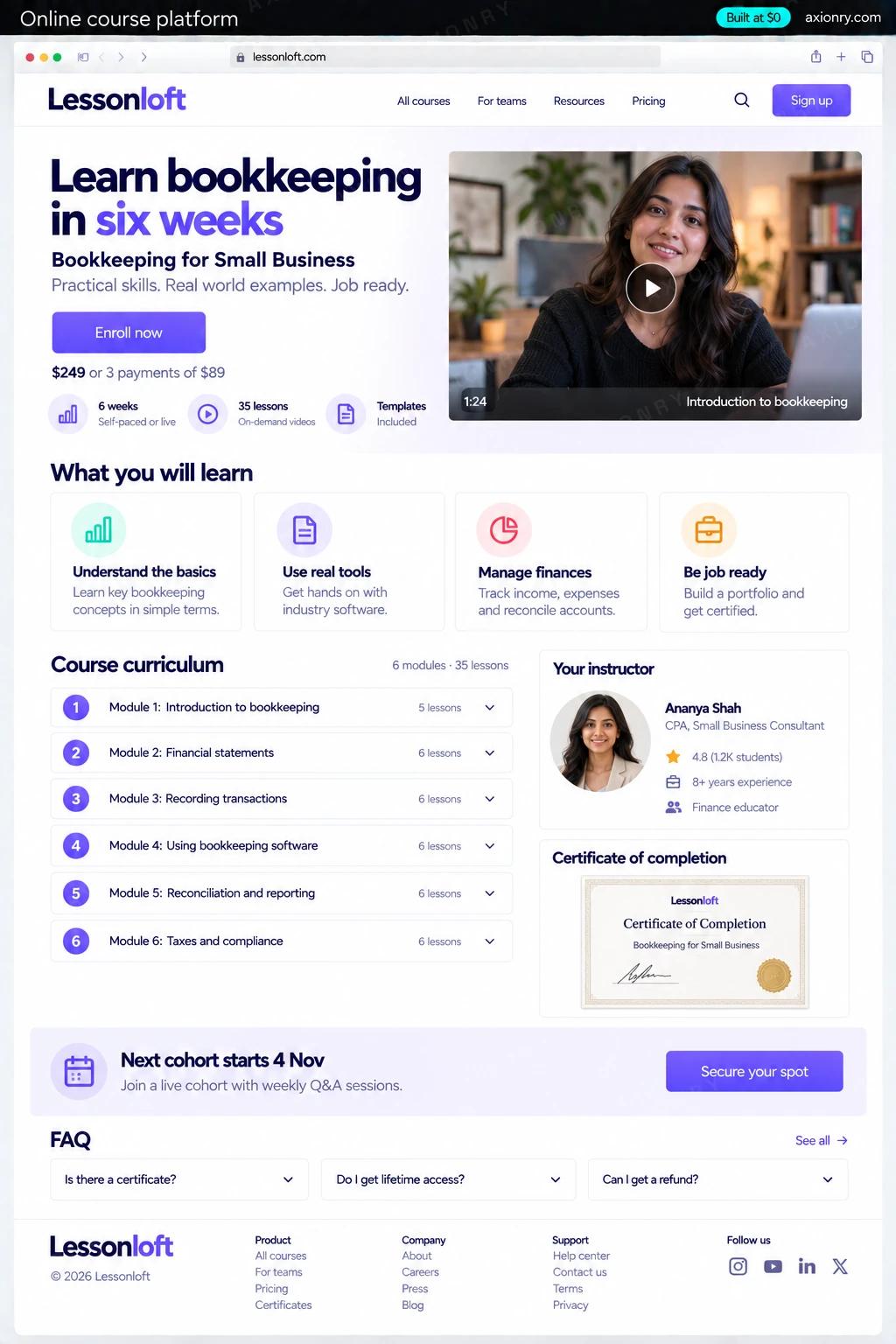
What is an online course platform?
An online course platform is where people buy a course, watch its lessons, take its quizzes and earn a certificate. A custom one, often called an LMS, is worth building when the rules are yours: how cohorts run, who gets access, how companies buy seats, and what the data about learners shows.
It is for course creators who have outgrown a hosted tool, training companies selling to employers, bootcamps running cohorts, and software companies teaching their own customers. If you are one creator selling a few courses, Teachable, Kajabi or Thinkific will serve you better for a monthly fee. Build when cohorts, company seats, several instructors or your own app are the business.
Run it for your own courses, or open it to other instructors as a marketplace. This page prices a single-brand platform with video, checkout, quizzes, certificates, cohorts and a community. Paying outside instructors their share through Stripe Connect is a later step.
Buys in one checkout, streams lessons on any device, sees their progress, takes quizzes and downloads a certificate they can share.
Uploads videos, builds lessons and quizzes, runs cohorts with start dates and deadlines, and answers questions under each lesson.
Revenue, refunds, completion and the lesson where people drop off, with no course platform taking a share of each sale.
What features does an online course platform need?
An online course platform needs 8 core features: streamed video lessons, checkout and payment plans, quizzes and assignments, verifiable certificates, cohorts and drip, lesson discussions, progress tracking and instructor studio.
Streamed video lessons
Videos upload straight to Mux or Cloudflare Stream, play at the right quality for each connection, and use signed URLs so shared links stop working.
Checkout and payment plans
Stripe Checkout for one-time purchases, installment plans and subscriptions, with coupons, tax and refunds.
Quizzes and assignments
Multiple-choice and short-answer quizzes with pass marks and retries, and file-upload assignments an instructor grades.
Verifiable certificates
A PDF certificate with a verification page, issued on completion, that employers can check and learners can add to LinkedIn.
Cohorts and drip
Lessons open by date or by progress, each cohort has its own deadlines and live-session links, and reminders go out automatically.
Lesson discussions
A thread under every lesson and a feed per cohort, moderated by instructors, so questions stay beside the content.
Progress tracking
Watch time, lesson completion and quiz scores per learner, with the lessons where people stop highlighted.
Instructor studio
A course builder with sections, lessons, quizzes and pricing, plus a preview of exactly what a learner sees.
What screens does an online course platform have?
It is built around 4 screens: course player, quiz, certificate and owner dashboard.
- 1Course playerA lesson video with the module list, progress through the course and the discussion under the lesson.
- 2QuizA module quiz on a phone, one question at a time, with the pass mark and retries.
- 3CertificateThe completion certificate with its verification ID.
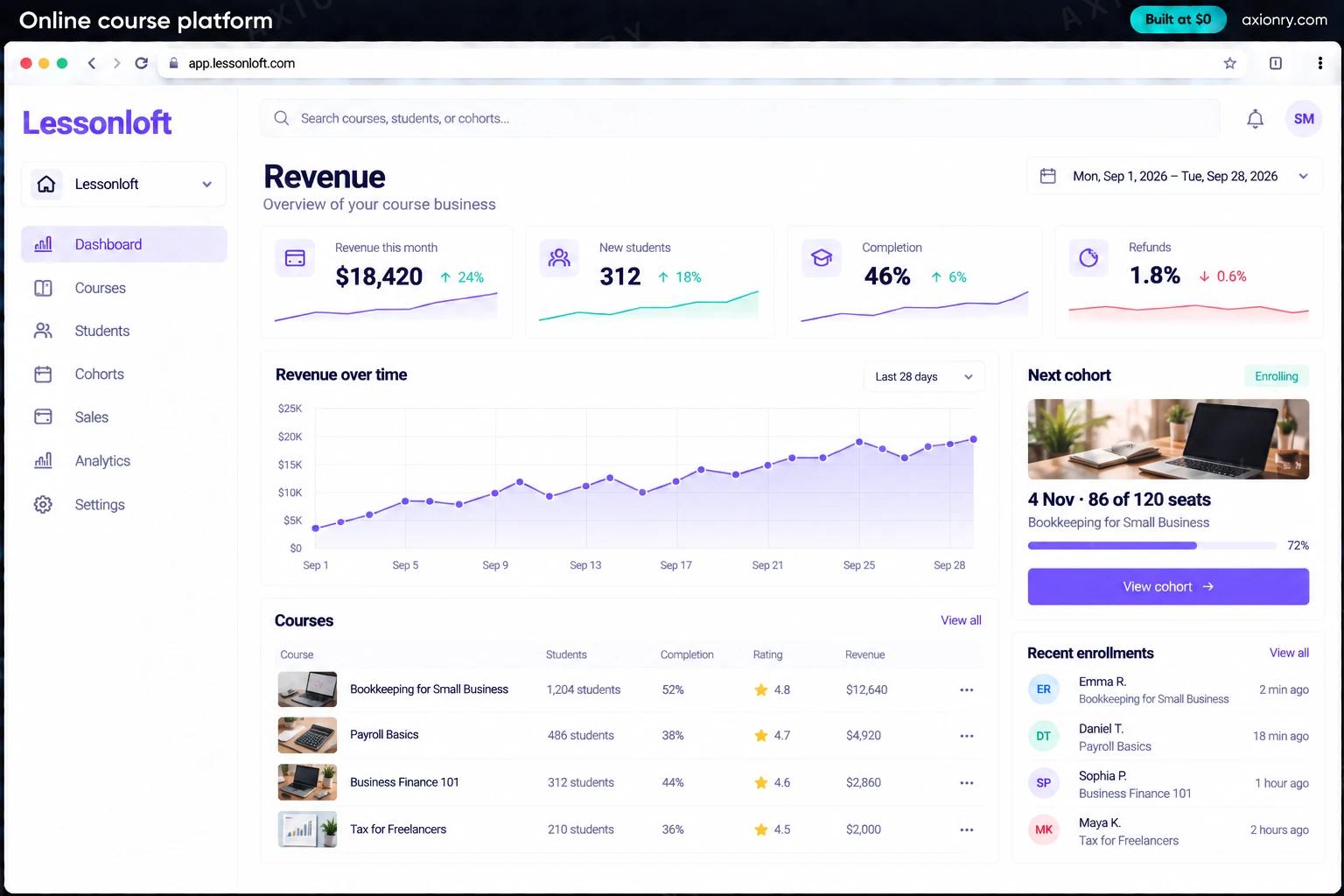
- 4Owner dashboardRevenue, new learners, completion and the next cohort's start date.
How does an online course platform work?
End to end, in 5 steps: a learner buys, they learn, they are tested, they finish and you see what works.
- 1
A learner buys
They choose a course or a cohort and pay through Stripe Checkout. A webhook grants access the moment payment succeeds, and a receipt and welcome email go out.
- 2
They learn
Lessons stream from Mux or Cloudflare Stream with signed playback URLs. Progress saves every few seconds, so they pick up where they stopped on any device.
- 3
They are tested
Quizzes are graded instantly against the pass mark, assignments land in the instructor's queue, and cohort deadlines send reminders before they pass.
- 4
They finish
Completing every required lesson and quiz issues a PDF certificate with a verification page, generated in a background job.
- 5
You see what works
The dashboard shows revenue, refunds, completion and the lesson where learners drop off, so you know which module to re-record.
What is the architecture and tech stack of an online course platform?
It has 8 layers: video (Mux or Cloudflare Stream), course site (Next.js and shadcn/ui), payments (Stripe Checkout, Stripe Billing and Stripe Tax), database (Postgres on Supabase or Neon), background jobs (Inngest or BullMQ), email (Resend or Postmark), files (S3 or Cloudflare R2) and hosting (Vercel for the app, video on Mux or Cloudflare). The diagram shows how a request moves through them.
| Layer | What we use | Why |
|---|---|---|
| Video | Mux or Cloudflare Stream | Encoding, adaptive streaming and signed playback without running video servers, billed by the minute. |
| Course site | Next.js and shadcn/ui | Course pages search engines can read, and one codebase for learners, instructors and admins. |
| Payments | Stripe Checkout, Stripe Billing and Stripe Tax | One-time sales, installment plans and subscriptions, with sales tax and VAT on digital products worked out per buyer. |
| Database | Postgres on Supabase or Neon | Enrollments, progress, quiz attempts and discussions are relational data that Postgres handles well. |
| Background jobs | Inngest or BullMQ | Certificates, drip releases and cohort reminders run on schedule and retry when something fails. |
| Resend or Postmark | Receipts, welcome sequences and deadline reminders that reach the inbox. | |
| Files | S3 or Cloudflare R2 | Assignment uploads and certificates stored privately and served through signed links. |
| Hosting | Vercel for the app, video on Mux or Cloudflare | Nothing to operate at launch, and video bandwidth billed apart from the app. |
How much does it cost to build an online course platform?
A launch-ready online course platform costs $15,500 to $30,500 to build and takes 4 to 8 weeks. A clickable demo costs $1,900 to $3,600 (6 to 12 working days), and running it costs $95 to $470 a month at the usage below. You start at $0 and pay per checkpoint you accept.
Priced with the same model as our AI product cost estimator, from the features above. Your price is fixed in writing after a 20-minute call, before any work starts.
| Version | Build cost | Timeline | What it is |
|---|---|---|---|
| Clickable demo | $1,900 to $3,600 | 6 to 12 working days | Clickable and real where it matters, on test data. Built to show users and investors, not to carry production traffic, so compliance work starts at launch. |
| Launch-ready | $15,500 to $30,500 | 4 to 8 weeks | Production architecture, tests on the risky paths, monitoring, and a handover your team can run. |
| Enterprise-grade | $20,500 to $39,500 | 6 to 9 weeks | Load tested, highly available, audited and documented for a larger team. |
What it costs to run
About 2,500 active learners a month on Vercel and managed Postgres; video storage and streaming are billed separately by Mux or Cloudflare Stream by the minute.
| Line | Per month | Assumes |
|---|---|---|
| Hosting and database | $80 to $210 | Vercel + managed services, sized for 2,500 monthly users |
| Email, monitoring, analytics | $20 to $260 | Free tiers cover most products at launch |
| Total | $95 to $470 | List prices, before any volume discount |
Build at $0: how you pay
$0 is when you pay, not what you pay. The launch-ready build is split into checkpoints with acceptance criteria agreed before work starts, and each one is invoiced only after you have seen it and accepted it.
- 1Scope and acceptance criteriaBefore work startsA call, then a written plan: every checkpoint with acceptance criteria you agree to before work starts.$0
- 2Architecture and first flowBy week 2Data model, service boundaries and one real flow working end to end.$3,100 to $6,000
- 3Core productBy week 4The main flows on production architecture, with a demo at the end of every week.$4,700 to $9,000
- 4The rest of v1By week 6Billing, admin and the flows that let you charge money and support users.$4,700 to $9,000
- 5Launch and handoverBy week 8Deployed on your accounts and documented, with 30 days of defect correction included.$3,100 to $6,000
What can you add to an online course platform after launch?
The additions most teams make next: an AI tutor per course, quizzes drafted from lessons, captions and translations and drop-off alerts.
An AI tutor per course
Answers learners' questions from your own lessons and transcripts, links to the moment in the video, and passes hard ones to the instructor.
Quizzes drafted from lessons
Questions generated from each lesson's transcript for the instructor to edit and approve before they go live.
Captions and translations
Transcripts and subtitles for every video, and translated captions for selling in new languages.
Drop-off alerts
A model that spots learners likely to stall and nudges them, or tells the instructor, before they give up.
What are the risks when building an online course platform?
Three things decide whether it works in production: tax on digital products, accessible from the start and shared logins and piracy.
Tax on digital products
Selling courses online can create sales tax duties in some US states and VAT on sales to EU consumers. Use Stripe Tax to calculate and collect it, or a merchant of record such as Paddle if you would rather not file those returns yourself.
Accessible from the start
Captions on every video, keyboard navigation and WCAG 2.1 AA contrast. Corporate and university buyers write accessibility into their contracts, and captions also serve everyone who watches with the sound off.
Shared logins and piracy
Signed, expiring video URLs stop casual link sharing, and limits on active sessions stop one login serving a whole team. Anything can be screen-recorded, so pay for full DRM only if leaks cost more than it does.