What is an AI tutor app?
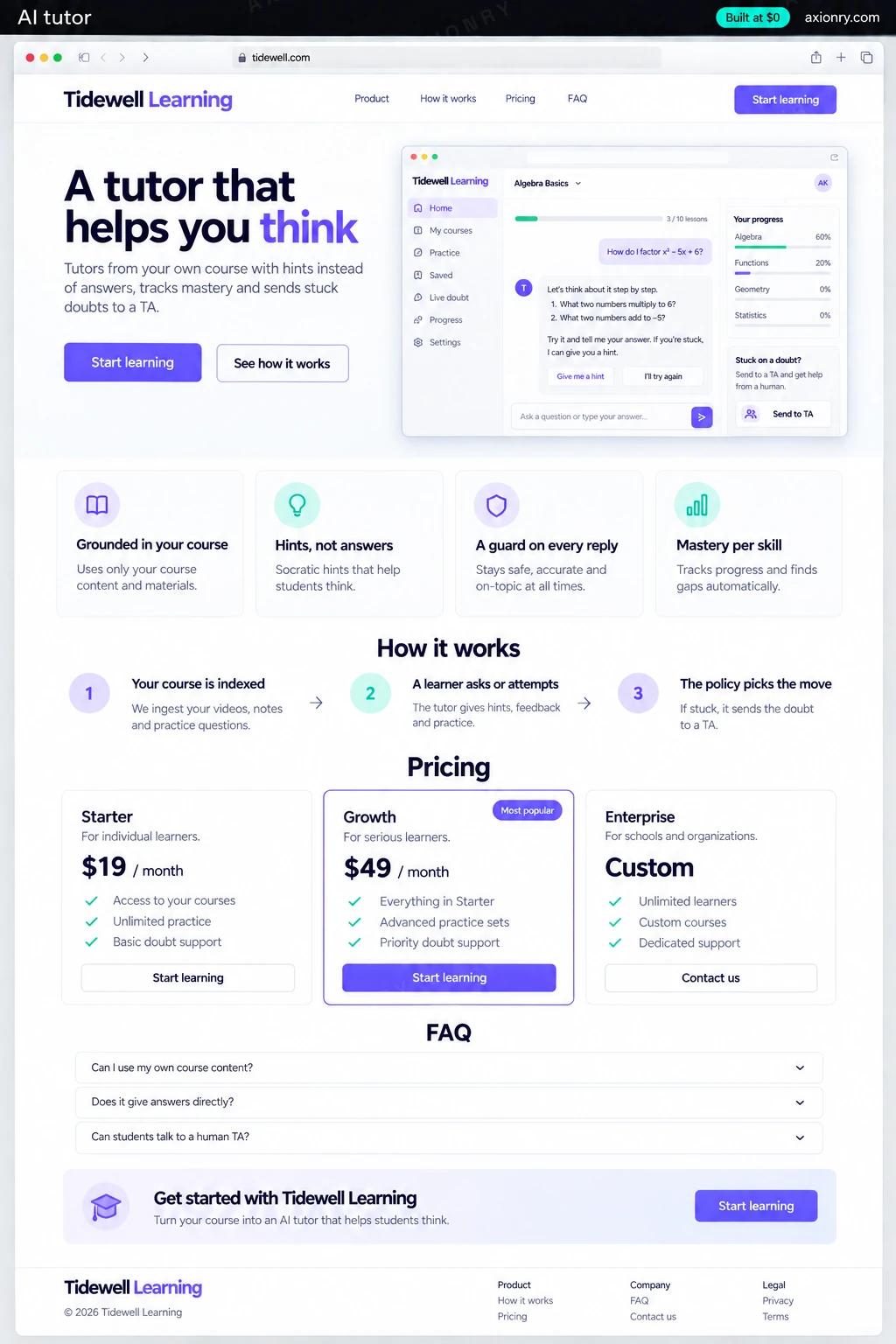
An AI tutor app is a tutor that knows your course. It explains concepts from your own lessons, asks the learner to try, spots the mistake and gives the smallest hint that helps, then checks they can do it unaided. It tracks mastery skill by skill, can talk as well as type, and hands stuck learners to a person.
It is for course platforms, test-prep companies, coding schools and tutoring businesses that want help available at any hour without handing out answers. Design matters more than the model: in published trials, tutors that carried the teacher's worked solutions and gave hints helped students learn, while plain chatbot access raised practice scores and then hurt exam results.
Course companies usually build it into their own platform first, and some later sell it to schools. What this page prices is a standalone tutor app for one course provider: a learner app with text and voice, your content indexed, mastery tracking, a TA doubt inbox and a teacher dashboard. Adding it inside a platform you already run reuses sign-in and content, which usually brings the price down.
Help at 11pm that explains instead of answering, hints sized to where they are stuck, and a person when the tutor cannot help.
Only the doubts the tutor could not resolve, each with the problem, the attempts, the hints already given and the likely misconception.
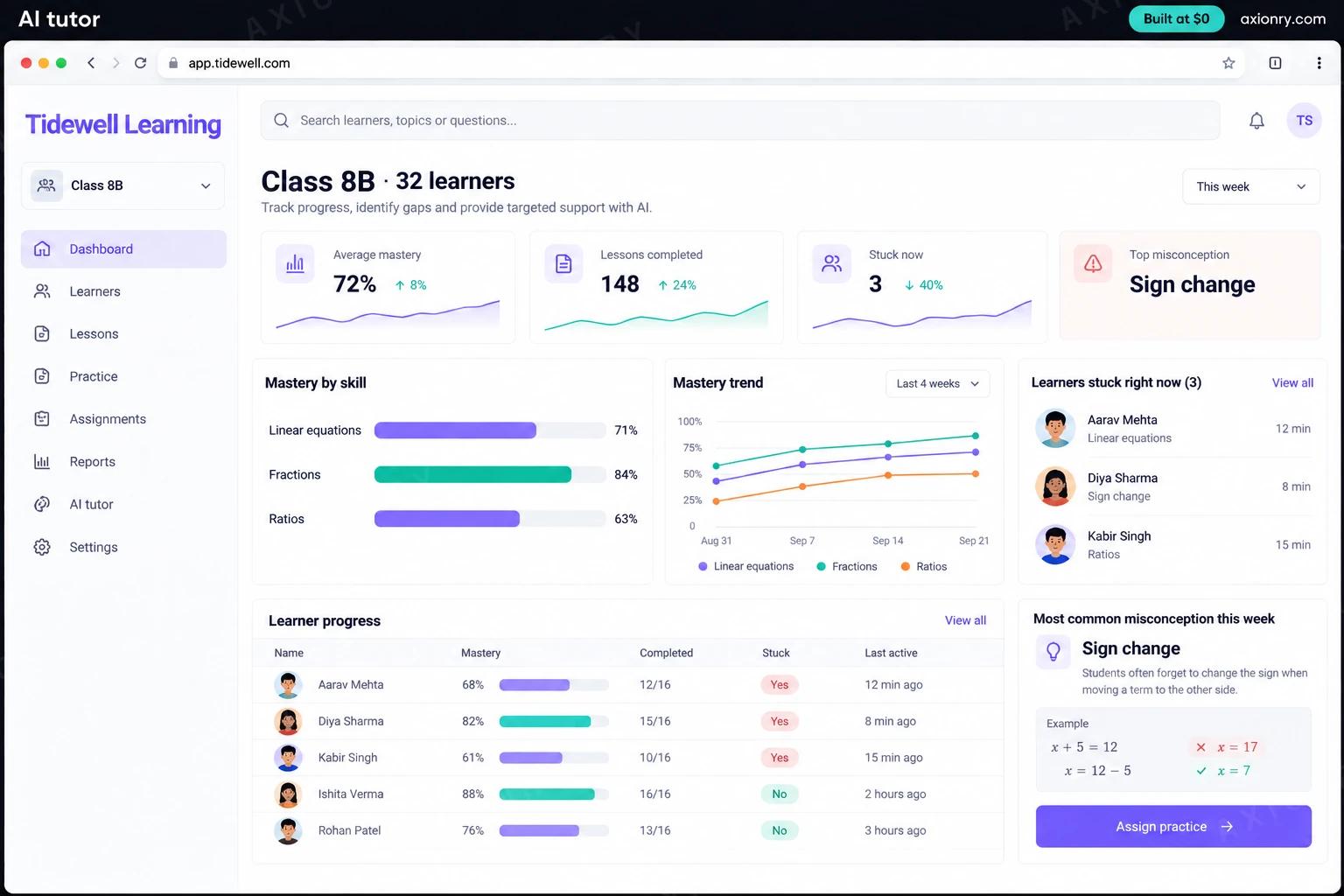
Mastery by skill for each class, the week's most common misconceptions, and an answer policy they set per assignment.
What features does an AI tutor app need?
An AI tutor app needs 8 core features: grounded in your course, hints, not answers, a guard on every reply, mastery per skill, spaced review, voice mode, doubts to a human TA and teacher controls.
Grounded in your course
Explanations and hints come from your lessons and worked solutions, fetched by exercise and learning objective, with the source shown.
Hints, not answers
A hint ladder from 'what did you try?' up to the next step, never the final answer on graded work.
A guard on every reply
A separate check compares each draft with the answer key before the learner sees it, so pleading and tricks do not extract answers.
Mastery per skill
Every unassisted attempt updates a mastery estimate per skill, which picks the next problem and the size of the next hint.
Spaced review
Mastered skills return days later, so the tutor catches what was learned for Tuesday's test and forgotten by Friday.
Voice mode
Learners can talk a problem through, under the same hint rules and guard as text, with patience for long thinking pauses.
Doubts to a human TA
After three hints without progress, or on request, the doubt goes to a TA with a brief, and the reply comes back in the same thread.
Teacher controls
Teachers set the answer policy per assignment, such as full solutions for practice and hints only for graded work, and see mastery by class.
What screens does an AI tutor app have?
It is built around 3 screens: practice with hints, voice mode and teacher dashboard.
- 1Practice with hintsThe learner's tablet: an equation, their wrong first step, and a hint that points at the step without giving the answer.
- 2Voice modeA learner talking a problem through on a phone, with the tutor's spoken question shown as a caption.
- 3Teacher dashboardClass mastery by skill, the most common misconception this week and the learners stuck right now.
How does an AI tutor app work?
End to end, in 5 steps: your course is indexed, a learner asks or attempts, the policy picks the move, the guard checks the reply and mastery updates, stuck doubts escalate.
- 1
Your course is indexed
Lessons, exercises, worked solutions and common mistakes are indexed by learning objective, and a teacher approves each entry.
- 2
A learner asks or attempts
A question or an answer arrives by text or voice, and the tutor policy reads the learner's mastery before any model runs.
- 3
The policy picks the move
Diagnose, hint at the right level, work a similar example or check understanding; the model only phrases the move already chosen.
- 4
The guard checks the reply
The draft is compared with the answer key and the age policy, and a draft that gives the answer away is rewritten before the learner sees it.
- 5
Mastery updates, stuck doubts escalate
Each attempt updates mastery and the teacher dashboard, and after three hints without progress the doubt goes to a TA with a brief.
What is the architecture and tech stack of an AI tutor app?
It has 8 layers: learner app (Next.js web app that installs on phones and tablets), course index (Postgres with pgvector, hybrid search), models (Claude Haiku 4.5 for most turns, Claude Sonnet 5 for hard problems), leak guard (An answer-key string match plus a Claude Haiku 4.5 check), learner model (Bayesian Knowledge Tracing in Postgres), voice (LiveKit Agents with Deepgram and Cartesia, cascaded), TA inbox and digests (Next.js, Postgres, email through Resend) and evaluation (A test set of real learner turns, run on every prompt or model change). The diagram shows how a request moves through them.
| Layer | What we use | Why |
|---|---|---|
| Learner app | Next.js web app that installs on phones and tablets | One codebase for every device a learner has; a native app can follow once you know where they study. |
| Course index | Postgres with pgvector, hybrid search | Lessons are chunked by learning objective and tagged by skill, and exercises are fetched by ID with their answer keys. |
| Models | Claude Haiku 4.5 for most turns, Claude Sonnet 5 for hard problems | Routing by difficulty keeps the typical learner cheap and saves the stronger model for second failures and long explanations. |
| Leak guard | An answer-key string match plus a Claude Haiku 4.5 check | It reads only the draft and the key, so a learner has nothing to argue with. |
| Learner model | Bayesian Knowledge Tracing in Postgres | Mastery is arithmetic a teacher can inspect, not a model's opinion, and it updates in microseconds. |
| Voice | LiveKit Agents with Deepgram and Cartesia, cascaded | Each sentence passes the guard before it is spoken; speech-to-speech models produce audio before anything can check it. |
| TA inbox and digests | Next.js, Postgres, email through Resend | Doubts arrive with a brief, and teachers get a weekly digest rather than one more dashboard to check. |
| Evaluation | A test set of real learner turns, run on every prompt or model change | Catches answer leaks and wrong hints before learners do, and makes a move to a cheaper model a measured decision. |
How much does it cost to build an AI tutor app?
A launch-ready AI tutor costs $27,500 to $55,000 to build and takes 7 to 12 weeks. A clickable demo costs $3,300 to $6,500 (2 to 5 weeks), and running it costs $2,000 to $4,000 a month at the usage below. You start at $0 and pay per checkpoint you accept.
Priced with the same model as our AI product cost estimator, from the features above. Your price is fixed in writing after a 20-minute call, before any work starts.
| Version | Build cost | Timeline | What it is |
|---|---|---|---|
| Clickable demo | $3,300 to $6,500 | 2 to 5 weeks | Clickable and real where it matters, on test data. Built to show users and investors, not to carry production traffic, so compliance work starts at launch. |
| Launch-ready | $27,500 to $55,000 | 7 to 12 weeks | Production architecture, tests on the risky paths, monitoring, and a handover your team can run. |
| Enterprise-grade | $36,000 to $71,500 | 8 to 14 weeks | Load tested, highly available, audited and documented for a larger team. |
What it costs to run
About 1,000 active learners a month, each sending around 250 tutor messages and using 30 minutes of voice, with most turns on Claude Haiku 4.5.
| Line | Per month | Assumes |
|---|---|---|
| Hosting and database | $45 to $120 | Vercel + managed services, sized for 1,000 monthly users |
| Model usage | $1,200 to $3,000 | Claude Haiku 4.5, 250 requests per user a month |
| Voice minutes | $750 | 30,000 minutes on Custom LiveKit stack |
| Email, monitoring, analytics | $0 to $150 | Free tiers cover most products at launch |
| Total | $2,000 to $4,000 | List prices, before any volume discount |
Build at $0: how you pay
$0 is when you pay, not what you pay. The launch-ready build is split into checkpoints with acceptance criteria agreed before work starts, and each one is invoiced only after you have seen it and accepted it.
- 1Scope and acceptance criteriaBefore work startsA call, then a written plan: every checkpoint with acceptance criteria you agree to before work starts.$0
- 2Architecture and first flowBy week 2Data model, service boundaries and one real flow working end to end.$5,500 to $11,000
- 3Core productBy week 6The main flows on production architecture, with a demo at the end of every week.$8,500 to $16,500
- 4AI on your real dataBy week 10Models, agents or voice working on real inputs, with evals and guardrails in place.$8,500 to $16,500
- 5Launch and handoverBy week 12Deployed on your accounts and documented, with 30 days of defect correction included.$5,500 to $11,000
What can you add to an AI tutor app after launch?
The additions most teams make next: sell to schools, practice sets in your method, parent reports and photo of the working.
Sell to schools
School workspaces, rostering through Clever or ClassLink, and a data processing agreement per district when you sell the tutor as a product.
Practice sets in your method
New practice problems generated from your answer keys in your course's notation, approved by a teacher before learners see them.
Parent reports
A short weekly note on what a child practiced, mastered and struggled with, sent only with a parent's consent.
Photo of the working
Learners photograph their handwritten steps, and the tutor reads each line to find exactly where the mistake happened.
What are the risks when building an AI tutor app?
Three things decide whether it works in production: children's data laws, answer leakage and the heaviest users set the margin.
Children's data laws
COPPA requires verifiable parental consent for under-13s and, since the 2025 amendments, separate consent before their data goes to third parties such as for AI training. FERPA lets schools share student records only with vendors under their direct control. Recordings of a child's voice count as personal information.
Answer leakage
A tutor that hands over answers can lift practice scores and still lower exam results, as one published study found. Enforce the hint policy in code, run a separate guard against the answer key on every reply, and watch the rate of rejected drafts; a rising rate means the tutor prompt needs work.
The heaviest users set the margin
Most learners are cheap to serve, and the few who talk to the tutor for hours are not. Cap voice minutes in the base plan, route by difficulty rather than habit, and set prices for the heavy learner rather than the median.
Where can you read more before you build?
- How to Build an AI Tutor: Grounded Answers, Socratic Guardrails and Cost Per Learner (2026)
- AI Product Development: the service behind this build