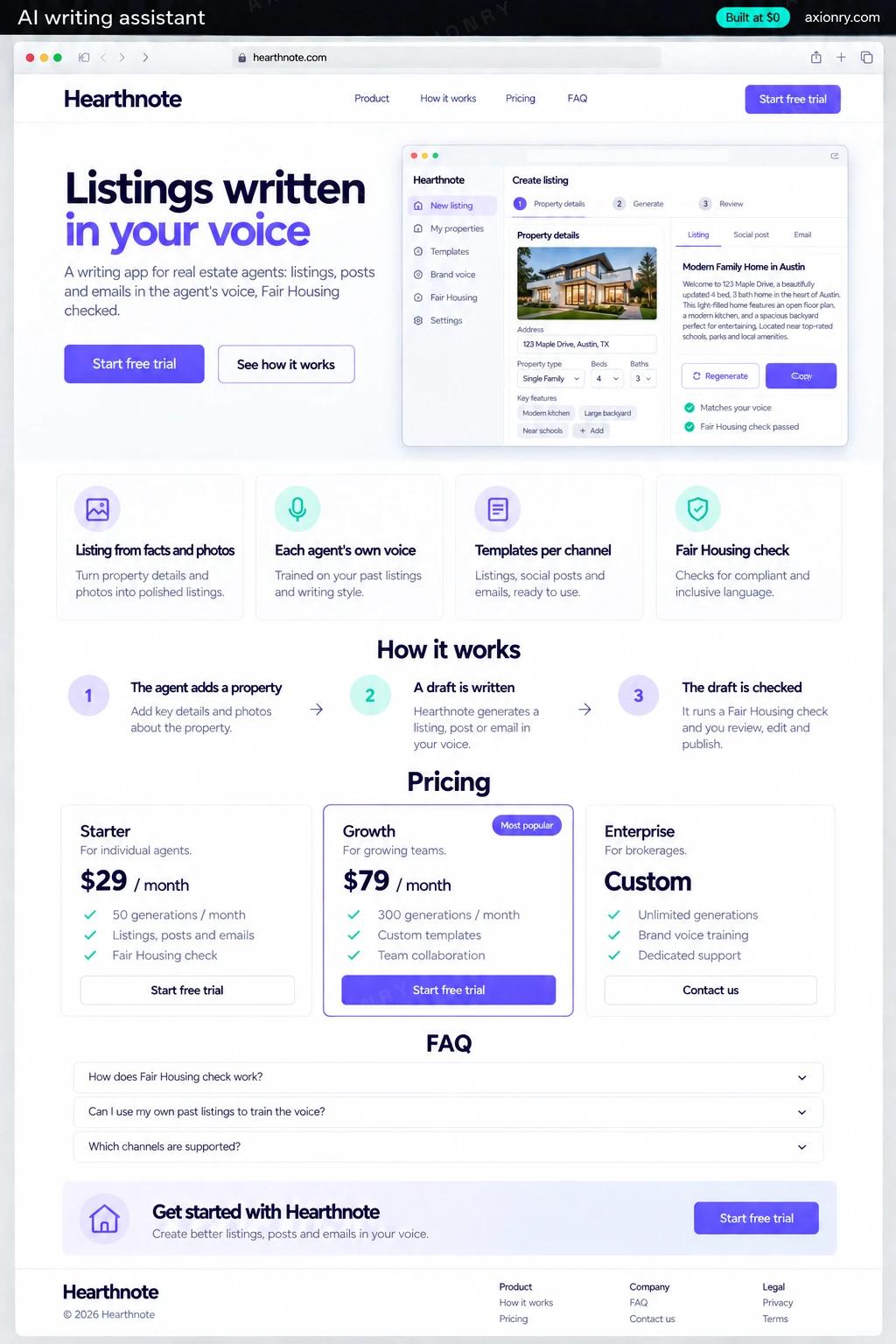
What is an AI writing assistant?
An AI writing assistant drafts, rewrites and checks text for a specific job. A niche version beats a general chatbot because it knows the formats, the rules and the facts that job depends on. For real estate, that means listing remarks within the MLS character limit, social posts and open-house emails written from the property's details.
Agents write the same kinds of text every week, under Fair Housing rules and portal limits, with little time to spare. A good assistant turns the property sheet into a first draft the agent edits rather than writes, keeps every claim tied to the facts, and flags wording that could read as a preference for or against a protected group. Brokerages can buy it per seat for all their agents.
The same build suits any niche with repeatable formats, such as recruiters, e-commerce sellers or insurance agents, and a brokerage could run it only for its own agents. This page prices a subscription product sold to agents and brokerages, with team seats, a web editor and a browser extension.
A listing, three social posts and an open-house email from one property sheet, in their own voice, ready to paste where they are needed.
A shared voice and banned-phrase list for every agent, Fair Housing checks on every draft, and one bill for all seats.
Seat-based subscriptions, usage and model cost per account, and the drafts agents edit most, which show where the prompts need work.
What features does an AI writing assistant need?
An AI writing assistant needs 8 core features: listing from facts and photos, each agent's own voice, templates per channel, fair Housing check, fact lock, editor with rewrite tools, browser extension and seats and subscriptions.
Listing from facts and photos
Beds, baths, square footage, upgrades and the listing photos become MLS remarks that mention what the photos show, not what the model imagines.
Each agent's own voice
Ten past listings or posts teach the assistant an agent's tone, favorite phrasing and the words they never use.
Templates per channel
MLS remarks, portal description, social caption, open-house email and just-sold postcard, each with its own length limit and format.
Fair Housing check
Phrases that signal a preference based on familial status, religion, disability or another protected trait are flagged with a neutral rewrite.
Fact lock
Every sentence is checked against the property sheet and photo tags, and a draft that adds a pool, a renovation or a school nobody entered is flagged.
Editor with rewrite tools
Shorten, expand, change tone or translate a paragraph in place, with a live character count for the channel and every version kept.
Browser extension
Opens beside the MLS input form, Gmail or a social scheduler and inserts the approved draft into the field the agent is typing in.
Seats and subscriptions
Solo and team plans on Stripe with a free trial, seat management for brokerages and usage caps that keep model costs predictable.
What screens does an AI writing assistant have?
It is built around 4 screens: draft editor, social post, browser extension and team view.
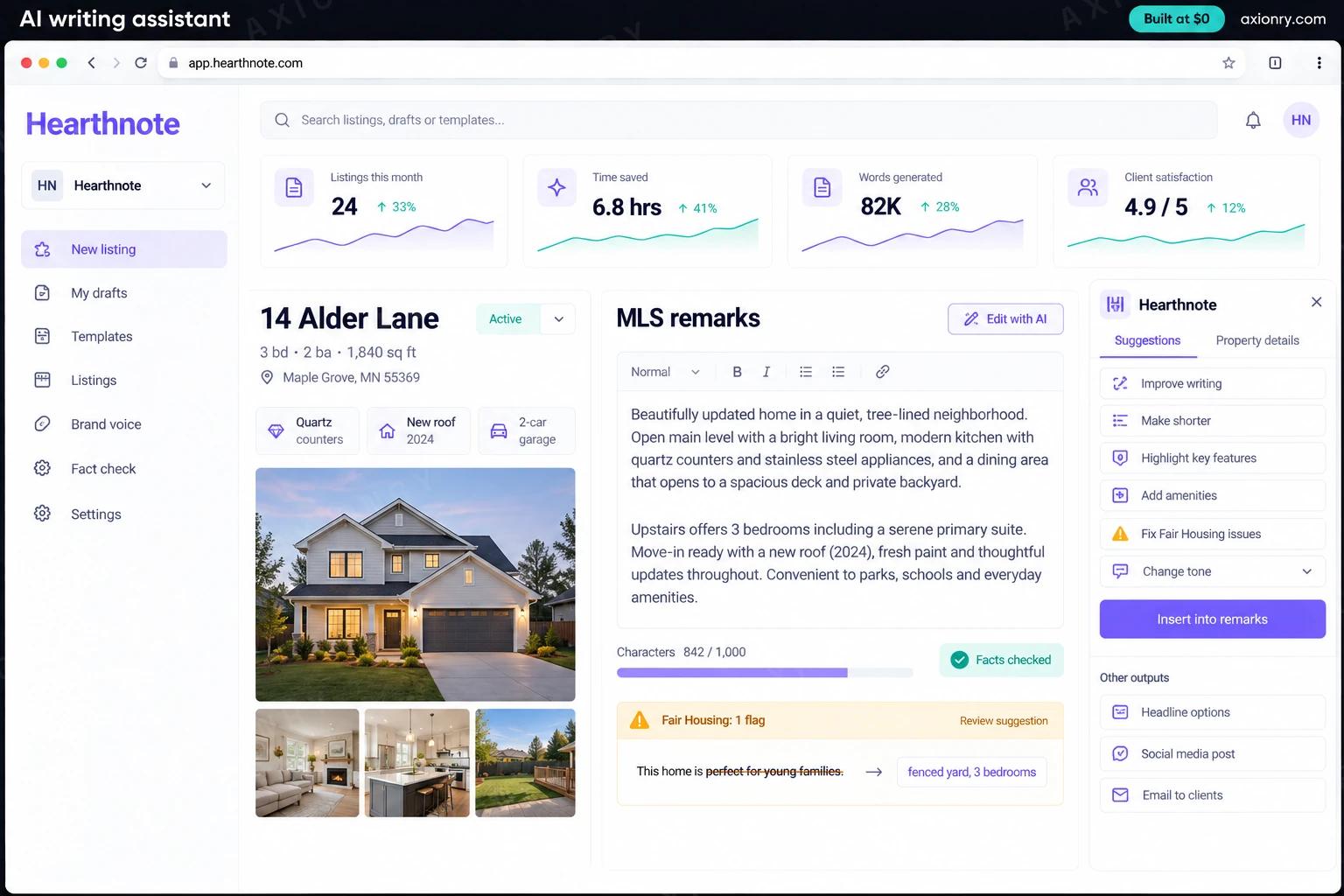
- 1Draft editorThe property sheet and photos on the left, the MLS remarks draft on the right with its character count, fact check and Fair Housing flags.
- 2Social postThe just-listed caption written from the same property, on the agent's phone, ready to copy.
- 3Browser extensionThe side panel that inserts the approved remarks into the listing form.
- 4Team viewThe brokerage's seats, drafts written this month and Fair Housing flags fixed.
How does an AI writing assistant work?
End to end, in 5 steps: the agent adds a property, a draft is written, the draft is checked, the agent edits and approves and it goes where it is needed.
- 1
The agent adds a property
They paste the property sheet or type the facts and drop in photos. Each fact is stored as a field, and the model lists what each photo actually shows.
- 2
A draft is written
The model writes the chosen format from those fields and the agent's voice examples, inside the channel's length limit.
- 3
The draft is checked
A fact check matches every claim to a field or a photo tag, and the Fair Housing check flags risky phrases with a neutral rewrite.
- 4
The agent edits and approves
They shorten, reword or regenerate in the editor, and every version is kept so a broker can see what changed.
- 5
It goes where it is needed
The extension inserts the remarks into the MLS form, posts and emails are copied or scheduled, and the account's usage and model cost update.
What is the architecture and tech stack of an AI writing assistant?
It has 8 layers: language model (Claude Sonnet 5, tested against GPT-5.6 Terra), voice profiles (Few-shot examples from each agent's past listings, stored in Postgres), checks (A phrase list plus a model classifier for Fair Housing, a field-by-field fact match), editor (Next.js with Tiptap), browser extension (Manifest V3 extension for Chrome, Edge and Firefox), billing (Stripe Billing with per-seat team plans), quality and cost (An evaluation set of graded listings, Langfuse traces) and hosting (Vercel, Postgres on Supabase or Neon). The diagram shows how a request moves through them.
| Layer | What we use | Why |
|---|---|---|
| Language model | Claude Sonnet 5, tested against GPT-5.6 Terra | Drafting quality is the product, so both are scored on your own graded listings before one is chosen. |
| Voice profiles | Few-shot examples from each agent's past listings, stored in Postgres | A handful of real examples usually beats a paragraph of style instructions, and they update as the agent edits. |
| Checks | A phrase list plus a model classifier for Fair Housing, a field-by-field fact match | The list catches known phrases; the classifier catches new ways of saying them. |
| Editor | Next.js with Tiptap | Rich text with inline suggestions, version history and a live character counter per channel. |
| Browser extension | Manifest V3 extension for Chrome, Edge and Firefox | Agents type inside the MLS and their inbox, so the drafts have to meet them there. |
| Billing | Stripe Billing with per-seat team plans | Trials, upgrades, seat changes and failed-payment retries without custom billing code. |
| Quality and cost | An evaluation set of graded listings, Langfuse traces | Every prompt change is scored before release, and model cost is visible per account. |
| Hosting | Vercel, Postgres on Supabase or Neon | A low fixed cost at launch and nothing to migrate when the first brokerage signs. |
How much does it cost to build an AI writing assistant?
A launch-ready AI writing assistant costs $24,000 to $48,000 to build and takes 6 to 11 weeks. A clickable demo costs $2,900 to $5,500 (2 to 4 weeks), and running it costs $410 to $1,150 a month at the usage below. You start at $0 and pay per checkpoint you accept.
Priced with the same model as our AI product cost estimator, from the features above. Your price is fixed in writing after a 20-minute call, before any work starts.
| Version | Build cost | Timeline | What it is |
|---|---|---|---|
| Clickable demo | $2,900 to $5,500 | 2 to 4 weeks | Clickable and real where it matters, on test data. Built to show users and investors, not to carry production traffic, so compliance work starts at launch. |
| Launch-ready | $24,000 to $48,000 | 6 to 11 weeks | Production architecture, tests on the risky paths, monitoring, and a handover your team can run. |
| Enterprise-grade | $31,000 to $62,000 | 8 to 13 weeks | Load tested, highly available, audited and documented for a larger team. |
What it costs to run
About 1,000 agents a month making around 60 drafting requests each on Claude Sonnet 5, plus hosting; listings with many photos cost a little more per draft.
| Line | Per month | Assumes |
|---|---|---|
| Hosting and database | $45 to $120 | Vercel + managed services, sized for 1,000 monthly users |
| Model usage | $360 to $900 | Claude Sonnet 5, 60 requests per user a month |
| Email, monitoring, analytics | $0 to $150 | Free tiers cover most products at launch |
| Total | $410 to $1,150 | List prices, before any volume discount |
Build at $0: how you pay
$0 is when you pay, not what you pay. The launch-ready build is split into checkpoints with acceptance criteria agreed before work starts, and each one is invoiced only after you have seen it and accepted it.
- 1Scope and acceptance criteriaBefore work startsA call, then a written plan: every checkpoint with acceptance criteria you agree to before work starts.$0
- 2Architecture and first flowBy week 2Data model, service boundaries and one real flow working end to end.$4,800 to $9,500
- 3Core productBy week 6The main flows on production architecture, with a demo at the end of every week.$7,000 to $14,500
- 4AI on your real dataBy week 9Models, agents or voice working on real inputs, with evals and guardrails in place.$7,000 to $14,500
- 5Launch and handoverBy week 11Deployed on your accounts and documented, with 30 days of defect correction included.$4,800 to $9,500
What can you add to an AI writing assistant after launch?
The additions most teams make next: MLS and CRM data, listings in more languages, walkthrough video scripts and a second niche.
MLS and CRM data
Property facts pulled from the MLS over the RESO Web API or from the brokerage CRM, instead of pasted in.
Listings in more languages
Descriptions and emails for buyers in Spanish or other languages, written from the same property sheet.
Walkthrough video scripts
Short scripts for listing reels, read by a text-to-speech voice over the photos.
A second niche
Swap the templates, checks and voice examples to sell the same engine to recruiters or insurance agents.
What are the risks when building an AI writing assistant?
Three things decide whether it works in production: fair Housing in every draft, no invented features and model cost against seat price.
Fair Housing in every draft
The Fair Housing Act bars ads that indicate a preference based on race, color, religion, sex, disability, familial status or national origin. Phrases like 'adults only' or 'ideal for a single professional' do that, so checks run on every draft and the agent approves the final text.
No invented features
A listing that claims a renovation or a view the home does not have is a misrepresentation with the agent's name on it. The fact check ties every claim to the property sheet or a photo, and anything it cannot match is flagged before the agent sees the draft.
Model cost against seat price
A few heavy users can cost more in model calls than their seat brings in. Cap requests per plan, reuse drafts for repeated requests, send rewrites to a cheaper model, and watch cost per account from the first week.