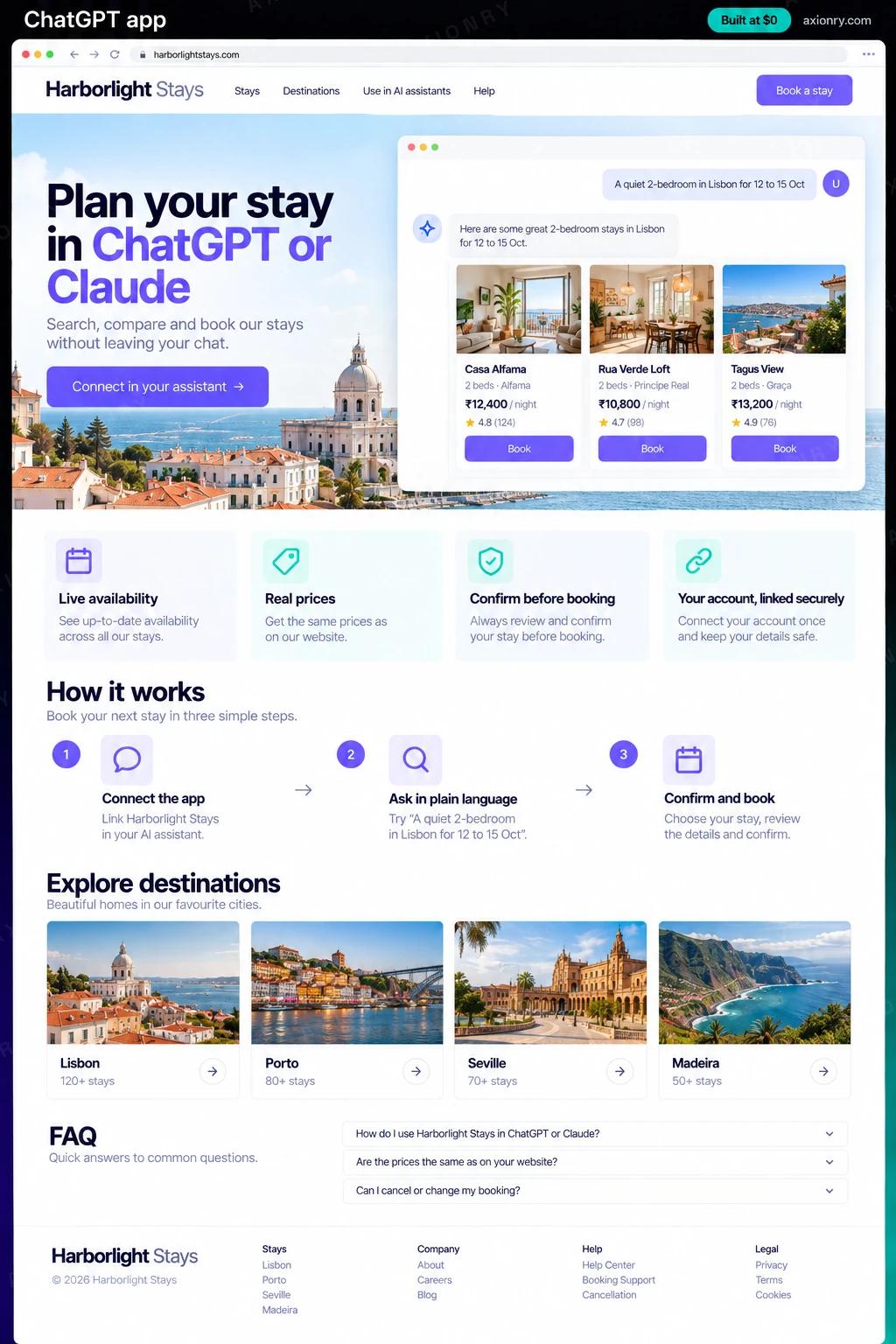
What is a ChatGPT app?
A ChatGPT app is your product running inside ChatGPT and, from the same MCP server, as a connector in Claude. The server offers tools the assistant can call, such as search your catalog or book a slot, sign-in so actions run as the user, and optional interactive components shown in the chat.
It suits companies whose customers already work in ChatGPT or Claude: SaaS tools, marketplaces, travel and booking, data providers, internal systems. The value is distribution and convenience. Instead of switching tabs, a user asks the assistant to pull last week's report or rebook a trip, and your product does it. The model runs on the host's side, so you do not pay for its tokens.
Most teams build it on top of an existing product and API, and some sell MCP servers as a product in their own right. This page prices a production app for one existing product: an MCP server with a focused set of tools, OAuth sign-in, interactive components where the host supports them, a usage dashboard, and submission to OpenAI's plugin directory and Claude's Connectors Directory.
Your product's data and actions inside the assistant they already use, signed in once, with results as cards, tables or forms instead of walls of text.
A new channel with usage by tool, the requests people actually make, and no front end to redesign.
OAuth scopes per action, tokens bound to your server, confirmation before anything writes, and a log of every call.
What features does a ChatGPT app need?
A ChatGPT app needs 8 core features: tools over your API, sign-in with OAuth, rich components in the chat, confirmation before writes, one server, several assistants, usage tracking, tested tool selection and ready for directory review.
Tools over your API
A focused set of tools such as search, get details, create and update, each with a description written for the model and a strict input schema.
Sign-in with OAuth
Users connect their account once through your login, and every call runs with their permissions, never a shared key.
Rich components in the chat
Results render as interactive cards, tables or forms, through the Apps SDK in ChatGPT and MCP Apps in Claude.
Confirmation before writes
Tools that change data are annotated as such, so the assistant asks the user to confirm before booking, buying or deleting anything.
One server, several assistants
One MCP server over Streamable HTTP serves ChatGPT, Claude and the other MCP clients your enterprise customers use.
Usage tracking
Calls by tool, user and account, with errors and latency, so you know which features people use through the assistant.
Tested tool selection
A set of real requests checks that the assistant picks the right tool with the right arguments, before and after every change.
Ready for directory review
Tool annotations, a privacy policy, a demo account without MFA, test prompts and screenshots, prepared for both directories' reviews.
What screens does a ChatGPT app have?
It is built around 3 screens: results in the chat, confirm before booking and usage dashboard.
- 1Results in the chatA user asks for hotels in Lisbon under $200 and the app answers with a carousel of hotel cards, prices and Book buttons.
- 2Confirm before bookingA confirmation card with the hotel, dates and total, which the user approves before the booking tool runs.
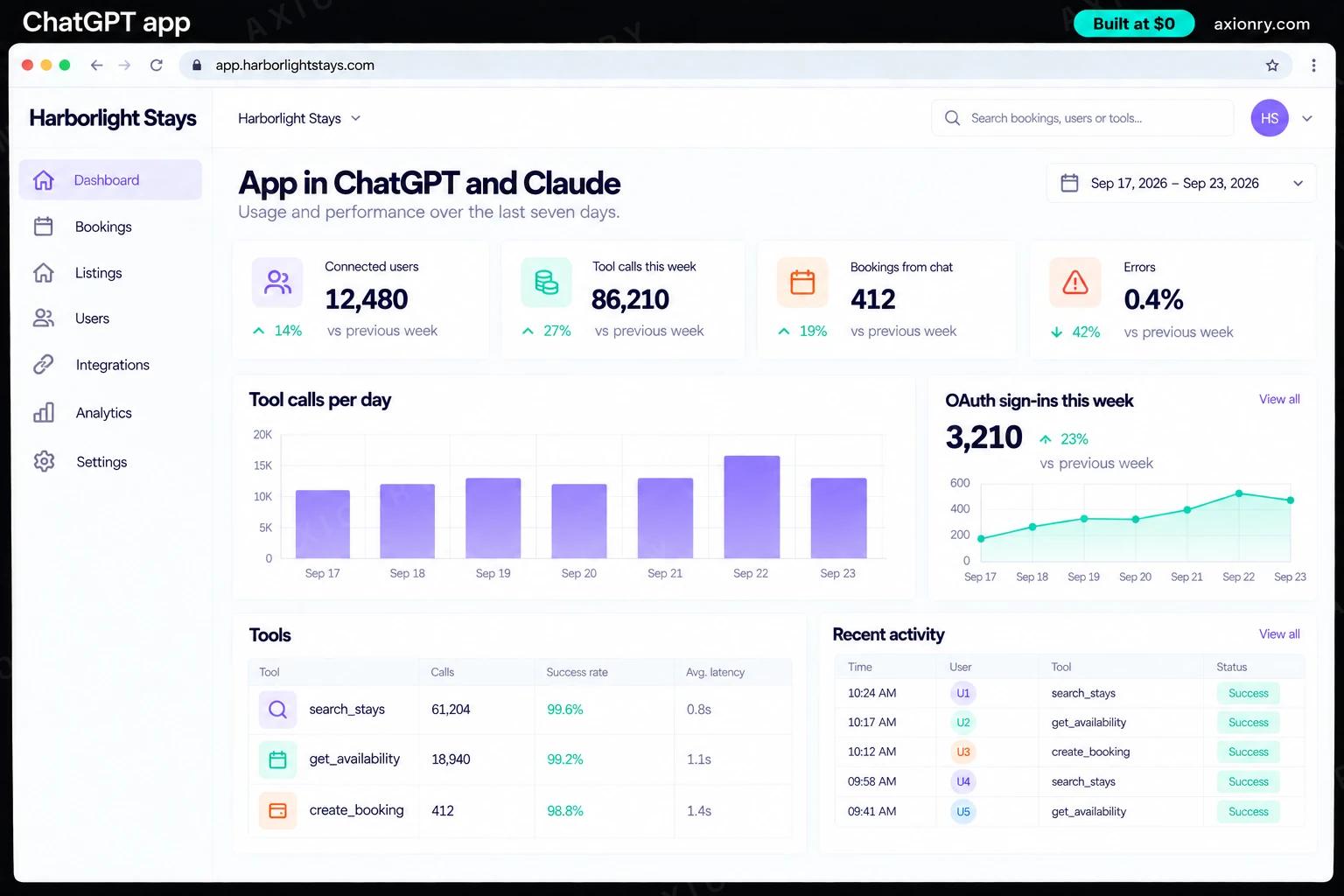
- 3Usage dashboardTool calls, connected accounts, bookings and error rate for the app over the last seven days.
How does a ChatGPT app work?
End to end, in 5 steps: the user connects your app, they ask in plain language, your MCP server does the work, writes ask first and you see what happened.
- 1
The user connects your app
They add your app in ChatGPT or your connector in Claude, sign in through your OAuth page, and approve the scopes it asks for.
- 2
They ask in plain language
The assistant reads your tool descriptions and decides when to call one, such as search_hotels with the city, dates and budget taken from the request.
- 3
Your MCP server does the work
The call arrives with the user's token. Your server checks the scope, calls your API and returns structured results, with a component to display them.
- 4
Writes ask first
Tools that book, buy or change data are marked as such, so the user confirms in the chat before your server runs them.
- 5
You see what happened
Each call is logged with the tool, account, latency and outcome, and the dashboard shows which tools people use and where they fail.
What is the architecture and tech stack of a ChatGPT app?
It has 7 layers: protocol (MCP over Streamable HTTP, official TypeScript or Python SDK), ChatGPT (OpenAI Apps SDK, published as a plugin), claude (Remote connector with MCP Apps for interactive UI), sign-in (OAuth with PKCE via WorkOS AuthKit or Auth0, or your own server), hosting (Cloudflare Workers or Vercel), usage and logs (Postgres, PostHog) and testing (MCP Inspector, plus an eval set of real requests). The diagram shows how a request moves through them.
| Layer | What we use | Why |
|---|---|---|
| Protocol | MCP over Streamable HTTP, official TypeScript or Python SDK | One server works in ChatGPT, Claude and other MCP clients, built to the current 2026-07-28 spec. |
| ChatGPT | OpenAI Apps SDK, published as a plugin | Your tools and components run inside ChatGPT and are listed through OpenAI's plugin directory after review. |
| Claude | Remote connector with MCP Apps for interactive UI | The same tools work in Claude, and MCP Apps renders your components there; listing goes through Anthropic's review. |
| Sign-in | OAuth with PKCE via WorkOS AuthKit or Auth0, or your own server | The assistant receives a token for one user and one server, so every call runs with that user's permissions. |
| Hosting | Cloudflare Workers or Vercel | A stateless MCP server scales like any web API, with no sessions to pin to one machine. |
| Usage and logs | Postgres, PostHog | Calls by tool and account for the product team, and a full log for support and security. |
| Testing | MCP Inspector, plus an eval set of real requests | Inspector checks the protocol; the eval set checks that the assistant chooses the right tool and arguments. |
How much does it cost to build a ChatGPT app?
A launch-ready ChatGPT app costs $11,000 to $21,500 to build and takes 3 to 7 weeks. A clickable demo costs $1,300 to $2,600 (4 to 8 working days), and running it costs $45 to $270 a month at the usage below. You start at $0 and pay per checkpoint you accept.
Priced with the same model as our AI product cost estimator, from the features above. Your price is fixed in writing after a 20-minute call, before any work starts.
| Version | Build cost | Timeline | What it is |
|---|---|---|---|
| Clickable demo | $1,300 to $2,600 | 4 to 8 working days | Clickable and real where it matters, on test data. Built to show users and investors, not to carry production traffic, so compliance work starts at launch. |
| Launch-ready | $11,000 to $21,500 | 3 to 7 weeks | Production architecture, tests on the risky paths, monitoring, and a handover your team can run. |
| Enterprise-grade | $14,500 to $28,000 | 4 to 8 weeks | Load tested, highly available, audited and documented for a larger team. |
What it costs to run
About 1,000 monthly users calling your tools from ChatGPT or Claude; the model runs on the assistant's side, so you pay only for hosting and logging.
| Line | Per month | Assumes |
|---|---|---|
| Hosting and database | $45 to $120 | Vercel + managed services, sized for 1,000 monthly users |
| Email, monitoring, analytics | $0 to $150 | Free tiers cover most products at launch |
| Total | $45 to $270 | List prices, before any volume discount |
Build at $0: how you pay
$0 is when you pay, not what you pay. The launch-ready build is split into checkpoints with acceptance criteria agreed before work starts, and each one is invoiced only after you have seen it and accepted it.
- 1Scope and acceptance criteriaBefore work startsA call, then a written plan: every checkpoint with acceptance criteria you agree to before work starts.$0
- 2Architecture and first flowBy week 1Data model, service boundaries and one real flow working end to end.$2,200 to $4,300
- 3Core productBy week 4The main flows on production architecture, with a demo at the end of every week.$3,300 to $6,500
- 4The rest of v1By week 6Billing, admin and the flows that let you charge money and support users.$3,300 to $6,500
- 5Launch and handoverBy week 7Deployed on your accounts and documented, with 30 days of defect correction included.$2,200 to $4,300
What can you add to a ChatGPT app after launch?
The additions most teams make next: more tools, one at a time, the same tools in your app, enterprise rollout and tools for other agents.
More tools, one at a time
Add write actions gradually, each with its own scope, confirmation and eval cases, instead of exposing your whole API at once.
The same tools in your app
The MCP server can also power an assistant inside your own product, so both channels share one set of tools and rules.
Enterprise rollout
Admin-managed installs, SSO and per-organization scopes for companies that deploy your connector to all their staff.
Tools for other agents
Descriptions, rate limits and audit logs tuned for customers who call your tools from their own agents, not only from chat.
What are the risks when building a ChatGPT app?
Three things decide whether it works in production: tokens must stay scoped, tool results can carry instructions and directory rules and review.
Tokens must stay scoped
Accept only tokens issued for your server, bind each one to a user and scope, and never pass them on to other services. The MCP authorization spec requires this, and it stops one user's session acting for another.
Tool results can carry instructions
Text your tools return, such as a review or a support ticket, can contain instructions aimed at the assistant. Return it as data, strip anything that reads like a directive, and require confirmation on every tool that writes.
Directory rules and review
OpenAI and Anthropic both review submissions against published rules on privacy policies, tool annotations, test accounts and data use. Design to them from the start, because reworking after a rejection pushes the launch back.