What is an AI image generator?
An AI image generator creates new images from a text prompt, a reference photo or both. In a product, the valuable version is narrow: a merchant's packshot placed in on-brand scenes, ad creatives in every size a campaign needs, or avatars from a few selfies, made by a diffusion model in seconds.
It is for e-commerce platforms, marketing tools and consumer apps whose users need many images in a consistent look. The value sits in three places: scenes that used to need a photo shoot take a minute, a brand's style is learned once as a LoRA instead of re-prompted every time, and a model you host has no per-image fee and no vendor deciding when it retires.
You can run it for your own brand's catalog or sell it to many brands, each with its own LoRA. The version priced here is a standalone web app for many brands on one self-hosted FLUX.2 [klein] 4B model. If you would make fewer than about 400,000 images a month and have no data restriction, the same model on Black Forest Labs' API costs less, and we will say so.
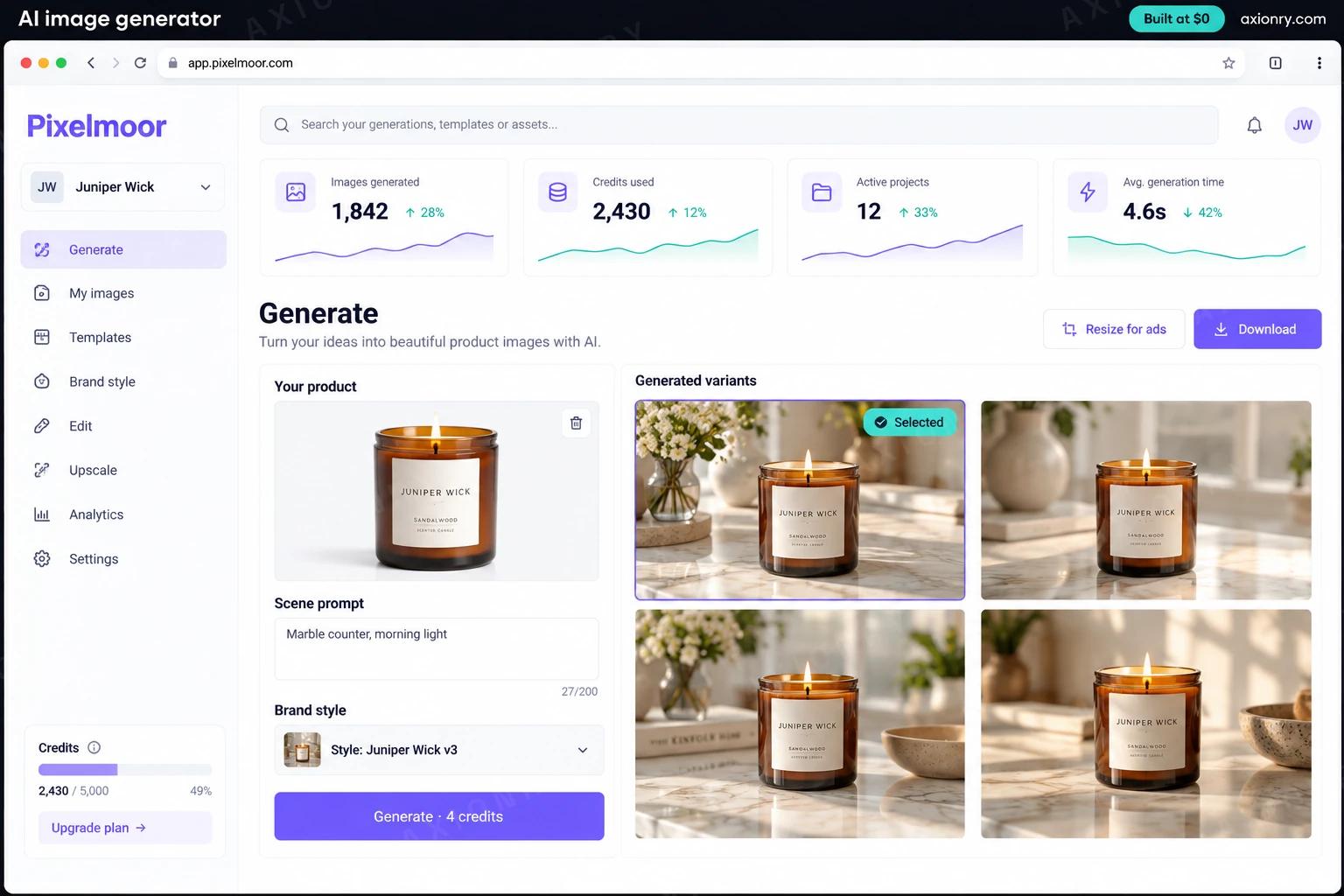
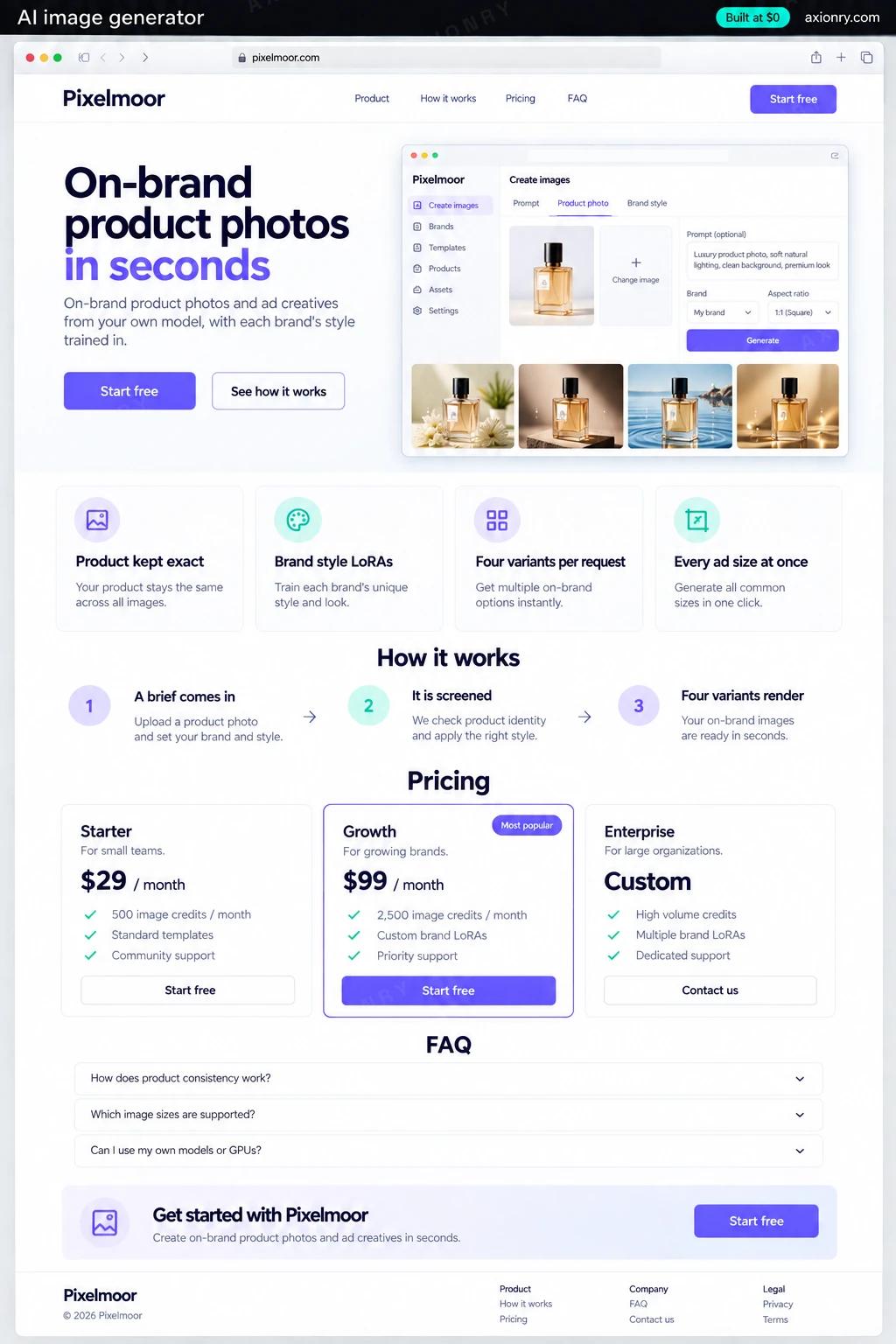
Uploads one product photo, picks a scene and gets four on-brand variants to choose from, in the sizes each channel needs.
A style trained on their own imagery and approved on a test grid before it goes live, so images look like the brand and not like the model.
One base model serving every brand, a cache that skips repeat work, and a record of each image's seed, adapter and cost.
What features does an AI image generator need?
An AI image generator needs 8 core features: product kept exact, brand style LoRAs, four variants per request, every ad size at once, a result cache, screened in and out, labeled as AI and plans with allowances.
Product kept exact
The product is cut out and kept pixel for pixel while only the scene around it is generated, so labels and logos stay legible.
Brand style LoRAs
Twenty to fifty of a brand's own images train a small adapter that carries its palette, light and composition into every render.
Four variants per request
One batched pass on the GPU returns four options, and the user regenerates only the one they almost liked.
Every ad size at once
Square, 4:5, 9:16 and banner versions come from the approved image, extended to fit rather than cropped blindly.
A result cache
An identical request, a double click or a template's default prompt returns the stored image without waking a GPU.
Screened in and out
Prompts and uploads are checked against your written policy first, every output passes an image safety classifier, and real faces need consent.
Labeled as AI
Each file carries a signed C2PA manifest and an invisible TrustMark watermark, so it can still be detected after a screenshot strips the metadata.
Plans with allowances
Monthly plans include a set number of images with paid top-ups, so heavy users pay more than light ones.
What screens does an AI image generator have?
It is built around 3 screens: generate, brand style and usage.
- 1GenerateThe web app: an uploaded packshot, a scene prompt, the brand style picked, and four generated variants to choose from.
- 2Brand styleThe LoRA screen: the training images, the blind test result against the base model, and the version that is live.
- 3UsageThe operator card: images this month, cache hit rate, blocked prompts and brand styles in use.
How does an AI image generator work?
End to end, in 5 steps: a brief comes in, it is screened, four variants render, outputs are checked and signed and delivered and recorded.
- 1
A brief comes in
The user uploads a product photo and picks a scene and a brand style. The gateway hashes model, style, prompt, seed and size, and returns stored images if that exact request has run before.
- 2
It is screened
A policy model checks the prompt against general rules and the brand's own, and uploads showing real faces go to a consent step before any GPU time is spent.
- 3
Four variants render
A worker with FLUX.2 [klein] 4B already in memory loads the brand's LoRA, masks the product so its pixels are kept, and generates four scenes in one batch.
- 4
Outputs are checked and signed
Each image passes a safety classifier and gets an invisible watermark and a signed C2PA manifest; blocked images are deleted, not stored.
- 5
Delivered and recorded
WebP files go to object storage behind signed URLs, the cache key is saved for next time, and the ledger records seed, adapter version and cost.
What is the architecture and tech stack of an AI image generator?
It has 8 layers: image model (FLUX.2 [klein] 4B (Apache 2.0), or Z-Image Turbo), brand style (LoRA adapters trained with diffusers or on fal), GPU (One L4 24GB on AWS to start, an L40S or H100 when traffic grows), serving (Python workers on diffusers, ComfyUI for multi-step graphs), cache and queue (Redis for the result cache, Amazon SQS for bulk jobs), safety and provenance (gpt-oss-safeguard-20b, ShieldGemma 2, c2pa-rs and TrustMark), plans and billing (Stripe Billing on a Next.js and Postgres app) and storage (Cloudflare R2 or S3, served through signed links). The diagram shows how a request moves through them.
| Layer | What we use | Why |
|---|---|---|
| Image model | FLUX.2 [klein] 4B (Apache 2.0), or Z-Image Turbo | Both are free for commercial use and fit on a 24 GB card; klein is built for fast editing, Z-Image Turbo scores higher on public arenas. |
| Brand style | LoRA adapters trained with diffusers or on fal | Training costs a few dollars per brand; the real work is curating the images and judging a fixed test grid. |
| GPU | One L4 24GB on AWS to start, an L40S or H100 when traffic grows | The 4B model needs about 13 GB, so a small card serves v1, and larger cards buy speed at peak. |
| Serving | Python workers on diffusers, ComfyUI for multi-step graphs | The base model stays in memory, adapters swap per request, and every version is pinned by hash. |
| Cache and queue | Redis for the result cache, Amazon SQS for bulk jobs | Template requests repeat often, and a 5,000-product catalog run should not block someone waiting for four images. |
| Safety and provenance | gpt-oss-safeguard-20b, ShieldGemma 2, c2pa-rs and TrustMark | Your own written policy on prompts, a classifier on every output, and a label that outlives a screenshot. |
| Plans and billing | Stripe Billing on a Next.js and Postgres app | Plans with image allowances and top-ups, without writing a billing system. |
| Storage | Cloudflare R2 or S3, served through signed links | WebP files are small, so storage and delivery stay a rounding error at launch volume. |
How much does it cost to build an AI image generator?
A launch-ready AI image generator costs $30,500 to $62,000 to build and takes 8 to 14 weeks. A clickable demo costs $3,600 to $7,500 (2 to 5 weeks), and running it costs $420 to $1,050 a month at the usage below. You start at $0 and pay per checkpoint you accept.
Priced with the same model as our AI product cost estimator, from the features above. Your price is fixed in writing after a 20-minute call, before any work starts.
| Version | Build cost | Timeline | What it is |
|---|---|---|---|
| Clickable demo | $3,600 to $7,500 | 2 to 5 weeks | Clickable and real where it matters, on test data. Built to show users and investors, not to carry production traffic, so compliance work starts at launch. |
| Launch-ready | $30,500 to $62,000 | 8 to 14 weeks | Production architecture, tests on the risky paths, monitoring, and a handover your team can run. |
| Enterprise-grade | $37,000 to $76,000 | 10 to 16 weeks | Load tested, highly available, audited and documented for a larger team. |
What it costs to run
About 1,000 monthly users on one L4 24GB running around the clock, plus hosting and storage; busier products add GPUs rather than paying per image.
| Line | Per month | Assumes |
|---|---|---|
| Hosting and database | $60 to $250 | AWS, sized for 1,000 monthly users |
| GPUs for your model | $360 to $640 | 1 x L4 24GB, running around the clock |
| Email, monitoring, analytics | $0 to $150 | Free tiers cover most products at launch |
| Total | $420 to $1,050 | List prices, before any volume discount |
Build at $0: how you pay
$0 is when you pay, not what you pay. The launch-ready build is split into checkpoints with acceptance criteria agreed before work starts, and each one is invoiced only after you have seen it and accepted it.
- 1Scope and acceptance criteriaBefore work startsA call, then a written plan: every checkpoint with acceptance criteria you agree to before work starts.$0
- 2AssessmentBy week 3Your data, stack and hardware examined end to end. A fixed fee, credited in full against the build.$6,000 to $12,500
- 3Core productBy week 7The main flows on production architecture, with a demo at the end of every week.$9,000 to $18,500
- 4AI on your real dataBy week 11Models, agents or voice working on real inputs, with evals and guardrails in place.$9,000 to $18,500
- 5Launch and handoverBy week 14Deployed on your accounts and documented, with 30 days of defect correction included.$6,000 to $12,500
What can you add to an AI image generator after launch?
The additions most teams make next: avatars from selfies, edit by instruction, store catalog sync and hero shots on a closed model.
Avatars from selfies
A per-user adapter trained on a few selfies, with consent recorded and the training photos deleted once it is built.
Edit by instruction
Change the background, relight a scene or remove an object by typing what to change, on the same model.
Store catalog sync
Pull products from Shopify and render the whole catalog into a seasonal scene overnight on the bulk lane.
Hero shots on a closed model
Route final hero images to a top closed model when a customer pays for that tier, while drafts stay on your GPU.
What are the risks when building an AI image generator?
Three things decide whether it works in production: license of the exact weights, real people and takedowns and machine-readable labels.
License of the exact weights
FLUX.2 [klein] 4B is Apache 2.0, but FLUX.2 [dev] and [klein] 9B ship under non-commercial licenses, and a LoRA inherits its base model's terms. Record the license of the file you serve next to its hash.
Real people and takedowns
Edited photos of real people are how image tools end up making intimate deepfakes. Gate face uploads behind consent, report apparent child sexual abuse material to NCMEC as US law requires, and meet the TAKE IT DOWN Act's 48-hour removal deadline.
Machine-readable labels
The EU AI Act has required providers to mark AI-generated images in a machine-readable way since August 2, 2026, and California's AI Transparency Act covers generative systems with over a million monthly users. Sign every file with C2PA and add a watermark that survives a screenshot.