Private ChatGPT on Your Own GPUs: Models, Hardware, Serving and Real Monthly Costs (2026)
- One 96GB GPU in your own AWS account (g7e.2xlarge at $3.363 an hour, $2,455 a month) runs gpt-oss-120b or Qwen3.8-27B for roughly 250 employees on my arithmetic. A production setup with a spare GPU, the CPU side and a quarter of an engineer costs about $9,480 a month.
- Against $20 seats (ChatGPT Business, Claude Team), GPUs in your own AWS account only become cheaper at about 720 employees, and owned hardware at about 600. Below that, self-host because data cannot leave your network, not to save money.
- Host an Apache 2.0 or MIT model and serve it with vLLM or SGLang, since TGI is now in maintenance mode. Expect a quality gap: the best open-weights model scores 46.3 on Artificial Analysis's index against 57.6 for the best closed model.
Open WebUI or LibreChat, signed in through your identity provider with OIDC or SAML and groups synced by SCIM. This is the product people see.
check the UI's branding licenceOne OpenAI-compatible endpoint with per-user keys, rate limits and an append-only log of every prompt, answer, document id and model version.
the audit trail lives hereA small classifier that checks prompts and answers against a policy you write. gpt-oss-safeguard-20b fits a 16GB GPU; Shieldstral 1.0 is a 3B model.
Apache 2.0An open embedding model, Postgres with pgvector, and a permission filter inside the query so an answer only cites what the asker may open.
permissions at query timevLLM or SGLang: continuous batching, prefix caching, an OpenAI-compatible API and a model name you choose.
TGI is in maintenance modeApache 2.0 or MIT weights pinned by version: gpt-oss-120b (65.2GB), Qwen3.8-27B (55.6GB in BF16), DeepSeek V4-Flash (159.6GB) for bigger boxes.
read each checkpoint's licenceOne RTX PRO 6000 in your AWS account, a DGX Spark on a desk, or two 4-GPU servers in your own rack.
$2,455 a month per cloud GPUWhat is a private ChatGPT, and what does it do for a company?
It is a chat assistant your employees or customers use like ChatGPT, except the model runs on GPUs you control. People sign in with company SSO, get answers grounded in your documents with citations, and every prompt and answer lands in an audit log you own. No prompt or document leaves your cloud account or building.
Three kinds of company need one. Firms whose contracts or regulators forbid sending client data to a third-party model provider: healthcare, legal, financial services and the public sector. Firms that have banned pasting client data into public chatbots and need an approved alternative so the ban holds. And product teams that want an assistant inside their own app without a per-token bill that grows with every customer. What it is worth is the sum of three things: the seats you would otherwise buy, the processor risk you remove, and a model version nobody can change under you.
A useful first version has six features: chat with history, answers from company documents with source links, SSO with groups, per-group access to models and document collections, an admin view of usage, and an exportable audit log. Agents and tool calls can wait until people use the first six every day. One naming note: ChatGPT is OpenAI's product. In this post the phrase means the same experience on a model you host, with nothing from OpenAI in the request path.
This is a reference design, not a case study. Every price below is a published list price I checked on 23 September 2026, every throughput figure is a published measurement with its source linked, and every monthly figure is arithmetic you can redo with your own inputs. Where I estimate, I say so.
Which open-weights model should you host in September 2026?
On one 80 to 96GB GPU: gpt-oss-120b or Qwen3.8-27B, both Apache 2.0. On two to four GPUs: DeepSeek V4-Flash or GLM-5.3-Flash, both MIT. On a full eight-GPU node: GLM-5.3, Kimi K3 or Xiaomi's MiMo-V2.6-Pro. Read the licence file of the exact checkpoint you download, because licences now differ inside a single model family.
The one-GPU class is where most private deployments should start. gpt-oss-120b has 117B parameters but activates 5.1B per token, and OpenAI states it runs on a single 80GB GPU because its mixture-of-experts weights were post-trained in 4-bit MXFP4. Qwen3.8-27B is a dense 27.8B model released in August 2026 with a 262,144-token native context. Gemma 4 moved to Apache 2.0 in April 2026, the first Gemma under that licence. Meta's newest open model is Muse Glimmer 30B, Apache 2.0, released on 10 August 2026. Llama 4 (April 2025) is now the older generation, and its use policy withholds the multimodal models from companies based in the EU.
Quality is the trade you accept. On Artificial Analysis's Intelligence Index, checked 23 September 2026, the best open-weights model, MiMo-V2.6-Pro, scores 46.3 against 57.6 for the best closed model, Claude Opus 5.5, and the one-GPU Qwen3.8-27B scores 33.7. A composite benchmark says little about how well a model summarises your leave policy, so run 200 of your own questions through the candidates before you commit.
Then read licences as carefully as benchmarks. Qwen3.8-27B is Apache 2.0, but Qwen3.8-Flash-Next from the same month ships under the new Qwen Community License 1.0, which requires a separate licence from Qwen before any company running a Model as a Service or AI work assistant business uses it commercially; purely internal use is carved out. Mistral Medium 3.5's modified MIT licence grants no rights at all to a company with more than $20 million of monthly revenue, and Kimi K3's licence makes Model-as-a-Service operators with more than $20 million of revenue in any 12 months sign a separate agreement. For an employee-only assistant these rarely bite. For a customer-facing one they can.
| Model (maker, release) | Total / active parameters | Licence | Weights on disk | Minimum GPUs (my sizing) | AA index, 23 Sep 2026 |
|---|---|---|---|---|---|
| gpt-oss-20b (OpenAI, Aug 2025) | 21B / 3.6B | Apache 2.0 | 13.8GB (MXFP4) | 1 x 16GB (OpenAI's figure) | not listed |
| Qwen3.8-27B (Alibaba, Aug 2026) | 27.8B dense | Apache 2.0 | 55.6GB BF16, 30.9GB FP8, 21.9GB NVFP4 | 1 x 48GB at FP8, 1 x 80GB at BF16 | 33.7 |
| Gemma 4 31B (Google, Apr 2026) | 31.3B dense | Apache 2.0 | 62.5GB BF16 | 1 x 80GB, 1 x 96GB for long context | not listed |
| Muse Glimmer 30B (Meta, Aug 2026) | 29.8B dense | Apache 2.0 | 59.6GB BF16, under 20GB at 4-bit (Meta) | 1 x 24GB at 4-bit (Meta's figure) | 17.5 |
| gpt-oss-120b (OpenAI, Aug 2025) | 117B / 5.1B | Apache 2.0 | 65.2GB (MXFP4) | 1 x 80GB (OpenAI's figure) | not listed |
| Llama 4 Scout (Meta, Apr 2025) | 109B / 17B | Llama 4 Community License | about 217GB BF16 | 2 x 141GB, or 1 x 80GB at 4-bit | not listed |
| Mistral Small 4 (Mistral, Mar 2026) | 119B / 6.5B | Apache 2.0 | about 121GB FP8, 70.8GB NVFP4 | 2 x 80GB (Mistral's own launch command) | not listed |
| DeepSeek V4-Flash (DeepSeek, Apr 2026) | 284B / 13B | MIT | 159.6GB (FP4 experts, FP8 rest) | 2 x 141GB or 4 x 80GB | not listed |
| GLM-5.3-Flash (Z.ai, Aug 2026) | 320B / 18B | MIT | 328.3GB FP8, 204.4GB NVFP4 | 4 x 141GB at FP8, 4 x 96GB at NVFP4 | 41.8 |
| DeepSeek V4.1-Flash (DeepSeek, Sep 2026) | 763B / 8B to 16B | MIT | 510.3GB | 8 x 141GB | 39.5 |
| GLM-5.3 (Z.ai, Aug 2026) | 753B / 40B | GLM-5.3 License | 755.6GB FP8 | 8 x 141GB | 44.8 |
| MiMo-V2.6-Pro (Xiaomi, Sep 2026) | 1.02T / 42B | MIT | 566.0GB | 8 x 141GB | 46.3 |
| Kimi K3 (Moonshot AI, Jun 2026) | 2.8T / 104B | Kimi K3 License | 1,560.9GB (MXFP4) | 16 x 141GB | 43.6 |
How much GPU memory does a model need at each size and quantisation?
Weights need parameters times bytes per parameter: 2 bytes in BF16, 1 in FP8, about half a byte at 4-bit. Qwen3.8-27B is 55.6GB in BF16, 30.9GB in FP8 and 21.9GB in NVIDIA's NVFP4 build. Then leave 20 to 30% more for the KV cache that holds every live conversation, which is my rule of thumb.
Mixture-of-experts models change the arithmetic in your favour. Total parameters decide how much memory you need; active parameters decide how fast each token comes out, because generating a token means reading the active weights from memory. gpt-oss-120b needs 65.2GB like a large model and generates like a 5.1B one. DeepSeek V4-Flash needs 159.6GB and activates 13B. The trade runs the other way for dense models: Qwen3.8-27B reads all 27.8B parameters for every token, so on the same GPU it uses less memory than gpt-oss-120b and generates more slowly.
Quantisation is where teams lose quality without noticing. gpt-oss is the clean case: OpenAI post-trained it in MXFP4 and ran every published evaluation in that format, so there is nothing to argue about. For other models, FP8 on Hopper and Blackwell and NVFP4 on Blackwell are formats the vendors now publish themselves (Qwen ships an FP8 build of Qwen3.8-27B and NVIDIA an NVFP4 build), and GGUF 4-bit is the llama.cpp format for desk boxes. Run your own 200-question set on the quantised build you will actually serve, not on the BF16 original.
Context length is the other memory bill. GitLab's published vLLM configuration for gpt-oss-120b on one 80GB H100 caps context at 32,768 tokens and 16 sequences and gets about 10 concurrent requests; the same guide needs four H100s to give requests 128K of context. For an internal assistant with retrieval, 32K is enough: a system prompt, five 800-token passages, the question and a 1,500-token answer come to under 8,000 tokens.
Which serving engine should you use: vLLM, SGLang, NVIDIA NIM or llama.cpp?
Use vLLM by default: an OpenAI-compatible server with continuous batching, prefix caching, LoRA adapters and a model name you choose. Use SGLang when a model's card recommends it or it measures faster on your hardware. Pay for NVIDIA NIM only if you already hold NVIDIA AI Enterprise licences. Keep llama.cpp for a desk box.
Hugging Face's own TGI documentation now says text-generation-inference is in maintenance mode and recommends vLLM, SGLang, llama.cpp or MLX instead. Model makers publish launch commands for vLLM and SGLang in their model cards: the Qwen3.8-27B card gives both, and Mistral calls vLLM the recommended path for Mistral Small 4. Pick one, pin its version and re-run your throughput test on every upgrade. vLLM's own work on gpt-oss for Blackwell reported a 38% throughput gain at maximum load from software changes alone.
NVIDIA NIM packages a model with an optimised engine and is free for research and development on up to 16 GPUs, but production use requires NVIDIA AI Enterprise at $4,500 per GPU per year or about $1 per GPU-hour on cloud marketplaces. On an AWS g7e.2xlarge at $3.363 an hour, that is about 30% on top of the GPU. It earns the fee when you want NVIDIA's support contract more than an open engine's flexibility.
llama.cpp is the right tool for one box and a small team. On a DGX Spark, llama.cpp's own benchmark runs gpt-oss-120b at about 59 tokens per second for one user, and eight parallel users share about 139 tokens per second, roughly 17 each. That serves a department, not a company. Ollama is the easiest way to try a model on a laptop; treat it as a prototyping tool rather than the serving layer for a few hundred people.
| vLLM | SGLang | NVIDIA NIM | llama.cpp | TGI | |
|---|---|---|---|---|---|
| OpenAI-compatible API | ✓ | ✓ | ✓ | ✓ | ✓ |
| Batching built for many concurrent users | ✓ | ✓ | ✓ | parallel slots, few users | ✓ |
| Licence or fee | Apache 2.0 | Apache 2.0 | $4,500 per GPU a year in production | MIT | Apache 2.0 |
| Status | active | active | active | active | maintenance mode |
| Named in the Qwen3.8-27B and Mistral Small 4 cards | both | both | neither | Mistral Small 4, via GGUF | neither |
| Best fit | default for 1 to 8 GPUs | when the model card recommends it | teams already on NVIDIA AI Enterprise | one desk box, one department | do not start a new build here |
How many concurrent users can one GPU serve?
Plan on about 10 concurrent generations per 80 to 96GB GPU for a 120B-class mixture-of-experts model at 32K context, which by my arithmetic covers roughly 250 employees. Published figures support the range: GitLab's H100 configuration handles about 10 concurrent requests, and a DGX Spark serves 8 parallel users at about 17 tokens per second each.
The step from concurrent streams to employees is an estimate, so here are its inputs. Assume an employee sends 30 prompts a working day and each answer is 500 tokens at 40 tokens per second: 12.5 seconds of generation, 375 seconds a day, 1.3% of an eight-hour day. Size for a peak hour at three times the average, and each employee occupies about 3.9% of a stream, so 10 streams cover about 256 people. Double the prompts or the answer length and the figure halves.
Prompt processing is the limit people miss. In this design every question arrives with 4,000 to 8,000 tokens of instructions and retrieved passages, and the GPU has to read them before the first word appears. llama.cpp's DGX Spark benchmark processes about 2,400 prompt tokens per second on gpt-oss-120b, so eight users who each send a 4,096-token prompt at the same moment wait 13.6 seconds for the batch to clear. That is the practical ceiling of a desk box. An RTX PRO 6000 has four times the FP4 compute of a DGX Spark on NVIDIA's own spec sheets, 4 petaFLOPS against 1, and that is the difference users feel as time to first word.
The ceiling rises steeply with shorter prompts and tuned kernels. SemiAnalysis's InferenceX measures gpt-oss-120b at 6,362 tokens per second per H100, with 8K-token prompts and 1K-token answers, while holding every user at 90 tokens per second, and 36,090 per B200: 5.7 times the H100 for 1.7 times Lambda's hourly price ($6.69 against $3.99). GitLab's 10 streams are the conservative end at 32K context; InferenceX is the tuned end at 8K. Size on the first and treat the second as headroom you earn with tuning.
| Hardware | Model | Engine | What was measured | Source |
|---|---|---|---|---|
| DGX Spark, 128GB unified memory | gpt-oss-120b MXFP4 | llama.cpp | 58.7 tok/s for 1 user; 139 tok/s shared by 8 users with 4,096-token prompts; about 2,400 prompt tok/s | llama.cpp benches, Feb 2026 |
| 2 x RTX PRO 6000 | gpt-oss-120b | vLLM | 230 tok/s for 1 request at 1K context; 235 tok/s across 6 requests at 32K context | Millstone AI, Jan 2026 |
| 1 x H100 80GB | gpt-oss-120b | vLLM | about 10 concurrent requests at 32K context, 16 sequences maximum | GitLab documentation |
| 4 x H100 80GB | gpt-oss-120b | vLLM | about 51 concurrent requests at 128K context | GitLab documentation |
| 1 x RTX PRO 6000 | GLM-4.5-Air, 4-bit AWQ | vLLM | 3,140 tok/s at 256 to 512 concurrent requests, 1K in and 1K out | CloudRift, Nov 2025 |
| 1 x H100, per GPU | gpt-oss-120b FP4 | InferenceX | 6,362 tok/s per GPU at 90 tok/s per user, 8K in and 1K out | SemiAnalysis InferenceX |
| 1 x B200, per GPU | gpt-oss-120b FP4 | InferenceX | 36,090 tok/s per GPU at 90 tok/s per user | SemiAnalysis InferenceX |
What does the full private ChatGPT architecture look like?
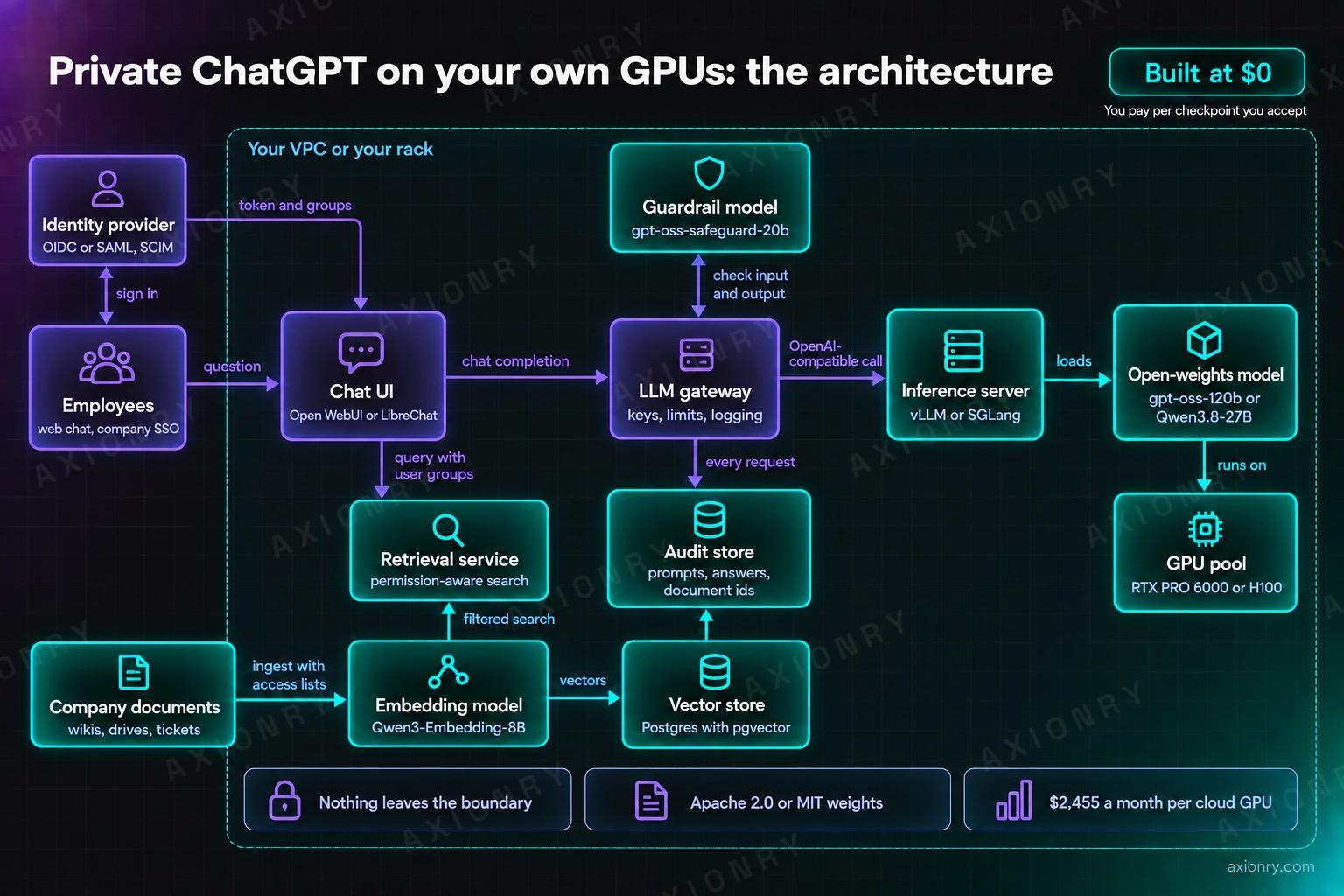
Thirteen boxes inside one boundary: employees, identity provider, chat UI, LLM gateway, guardrail model, retrieval service, company documents, embedding model, vector store, inference server, the open-weights model, a GPU pool and an audit store. Prompts, documents and answers never cross the boundary; the identity provider only sees sign-ins.
The chat UI is the product people see, and there are two credible open options. Open WebUI has SSO through OIDC and LDAP, SCIM 2.0 provisioning, role-based access per model and hybrid search over documents. Its licence, though, forbids removing or replacing the Open WebUI branding once more than 50 people have access to a deployment in any rolling 30-day period, unless you have written permission or an enterprise licence. LibreChat is MIT licensed, supports OAuth2, SAML and LDAP, and ships agents and MCP. If your own logo matters at company scale, start from LibreChat or build the UI yourself.
Answers from company documents are a retrieval problem, not a model problem. Sync documents together with their access lists, embed them with an open model such as Qwen3-Embedding-8B (Apache 2.0), store vectors in Postgres with pgvector, and filter by the asker's groups inside the query rather than after it. Filter after retrieval and a top-50 search where most chunks fail the permission check leaves the model almost nothing to cite. The full pattern is in permission-aware RAG over private documents.
Between the UI and the model sits a gateway, and it is where compliance lives. It issues per-user keys, enforces rate limits, and writes every prompt, answer, retrieved document id, user and model version to an append-only audit store, with a retention period your legal team sets. LiteLLM's proxy (MIT outside its enterprise directory) covers keys, budgets, rate limits and logging if you would rather not write one. Guardrails are a small model on the same path: gpt-oss-safeguard-20b reads a policy you write and fits a 16GB GPU, and Mistral's Shieldstral 1.0 is a 3B Apache 2.0 classifier. The threat model for all of it is covered under LLM security.
What are the minimum setups, and what do they cost per month?
Three setups cover the range: one 96GB GPU in your own AWS account at $2,455 a month, a $4,699 DGX Spark on a desk for a team of about 50, and a high-availability pair of 4-GPU servers at $251,709 up front, about $7,000 a month over three years before power.
One GPU in your own cloud account is the cleanest start. AWS's g7e.2xlarge gives you one 96GB RTX PRO 6000 Blackwell at $3.363 an hour on demand: $3.363 times 730 hours is $2,455 a month, enough for gpt-oss-120b with about 30GB left for conversations. An H100 in a p5.4xlarge costs $6.88 an hour, $5,022 a month, for 16GB less memory. GPU clouds are cheaper (RunPod lists the same RTX PRO 6000 at $2.09 an hour, $1,526 a month), but your prompts then leave your own account, which is the thing this project exists to prevent. One GPU is not highly available: when it restarts, chat is down.
A small on-premises box suits a department, not a company. NVIDIA's DGX Spark has 128GB of unified memory, a 240-watt power supply, and has cost $4,699 since an 18% price rise in February 2026 that NVIDIA put down to memory supply. Over 36 months that is $131 a month, plus about $26 of power at full draw and $0.15 per kWh, my rate assumption. Eight users at about 17 tokens per second each wait 29 seconds for a 500-token answer; on the usage assumptions above that covers about 87 people at peak, and I would plan for 50 to leave room for long prompts. The next step up, a workstation with one RTX PRO 6000, now costs $16,000 for the card alone, 87% more than at launch.
High availability means two of everything and a spare GPU. In the cloud, three g7e.2xlarge instances across two availability zones behind a load balancer cost $7,365 a month and keep about 500 employees served if one instance fails. On premises, Supermicro's store lists its SYS-422GA-NRT-01-G2 with four RTX PRO 6000 cards at $125,854.56: $251,709 for a pair, $6,992 a month over 36 months, plus about $526 a month for the cards' 4.8kW at $0.15 per kWh. Seven working GPUs at about 250 people each is roughly 1,750 employees with one card in reserve, or room for GLM-5.3-Flash in NVFP4 across four cards.
| Setup | Hardware and list price | Monthly arithmetic | Model that fits | Serves (my estimate) | Main weakness |
|---|---|---|---|---|---|
| One GPU, your AWS account | g7e.2xlarge: 1 x RTX PRO 6000 96GB, $3.363 an hour | $3.363 x 730 = $2,455 | gpt-oss-120b or Qwen3.8-27B BF16 | about 250 employees | No redundancy |
| One H100, your AWS account | p5.4xlarge: 1 x H100 80GB, $6.88 an hour | $6.88 x 730 = $5,022 | gpt-oss-120b at 32K context | about 250 employees | Twice the g7e's price for less memory |
| One GPU, third-party GPU cloud | RunPod RTX PRO 6000, $2.09 an hour | $2.09 x 730 = $1,526 | Same as the g7e | about 250 employees | Prompts leave your account |
| Desk box | DGX Spark 128GB, $4,699 | $4,699 / 36 = $131, plus about $26 of power | gpt-oss-120b MXFP4 | about 50 people | Slow prompt processing under load |
| High availability in your cloud | 3 x g7e.2xlarge across two zones | 3 x $2,455 = $7,365, plus about $400 for the CPU side | gpt-oss-120b or Qwen3.8-27B | about 500 with one spare | You pay for the spare every hour |
| High availability on premises | 2 x Supermicro 4-GPU server, $125,854.56 each | $251,709 / 36 = $6,992, plus about $526 of GPU power | Up to GLM-5.3-Flash NVFP4 | about 1,750 with one spare | Hardware failures and spares are yours |
Is self-hosting cheaper than ChatGPT Business or Claude Team seats?
Not until about 720 employees on my arithmetic, if the GPUs sit in your own AWS account. ChatGPT Business (formerly ChatGPT Team) and Claude Team both list $20 a seat a month billed annually. A production self-hosted setup costs about $9,480 a month for its first 250 people once you count a spare GPU and a quarter of an engineer.
Here is the model, so you can change its inputs. Self-hosted monthly cost is $4,170 for a quarter of an engineer, $400 for the CPU side, and $2,455 per g7e GPU, with one GPU per 250 employees plus one spare. At 250 employees that is $9,480 against $5,000 of seats. At 500 it is $11,935 against $10,000. At 1,000 it is $16,845 against $20,000, and at 2,000 it is $26,665 against $40,000. On the owned on-premises pair, 1,750 employees cost about $12,088 a month against $35,000 of seats, and that line crosses seats at about 600 people.
The seat is not the same product, and pretending otherwise flatters self-hosting. A seat buys a frontier model (57.6 on the index for the best closed model against 33.7 for Qwen3.8-27B on one GPU), connectors, agents and someone else's on-call rota. Claude Team covers 2 to 150 seats; above that, Claude Enterprise lists $20 a seat plus usage at API rates, so heavy users cost more than the seat price. OpenAI does not publish ChatGPT Enterprise pricing, and it says it does not train on Business workspace data. If a no-training commitment satisfies your compliance team, you may not need any of this.
The pattern I would recommend is hybrid: the private model for anything touching client, patient or employee records, and seats for everyone else. That keeps the GPU count small and confines the quality gap to the work that legally needs it. The token-level economics behind both options are in LLM inference cost optimization, and you can price your version in the AI product cost estimator.
When should you not self-host a private ChatGPT?
Do not self-host if fewer than about 600 people will use it and no rule keeps data in your network, if the work needs frontier-model quality, if nobody can own GPU operations, or if a managed model inside your own cloud account already satisfies compliance. In each case seats or a managed API are the better buy.
The managed middle path is underrated. On Amazon Bedrock, AWS states that model providers have no access to Bedrock logs or to customers' prompts and completions, and traffic can stay inside your VPC over PrivateLink. For some compliance reviews that closes the question with frontier models and a fraction of the operational load. It does not satisfy a rule that the weights must run on hardware you own, and the provider, not you, decides when a model version is retired. Those two requirements are the strongest reasons to self-host.
Budget for the work nobody demos. Qwen alone released open weights for versions 3.5, 3.6 and 3.8 between February and August 2026, so expect to re-evaluate the model every few months, upgrade the engine, re-run your quality and throughput tests, and staff an on-call rota for a service people now depend on. If you are a startup, cloud credits can carry the first year of GPU bills: I secured $300K of them ($200K from Microsoft for Startups and $100K from AWS Activate), and the playbook is in how to get cloud credits.
If you want this running on your hardware or in your cloud account, that is what private LLM infrastructure covers, and it is built at $0: the work is split into checkpoints with acceptance criteria agreed before work starts, and each one is invoiced only after you have seen it and accepted it.
One g7e.2xlarge to prove it, three across two zones before launch, owned servers once usage is steady.
Owned servers cross $20 seats near 600 users and GPUs in your AWS account near 720. Keep seats for work that needs a frontier model.
Bedrock-style isolation, frontier models and no GPUs to operate.
$20 a seat a month is cheaper and better until your usage says otherwise.
A private model nobody upgrades becomes last year's model with an outage rota attached.
Private ChatGPT on your own GPUs: common questions
→How much does it cost to run a private ChatGPT on your own GPUs?
About $2,455 a month for one 96GB RTX PRO 6000 in your own AWS account (g7e.2xlarge at $3.363 an hour), which on my arithmetic serves roughly 250 employees with gpt-oss-120b. A production setup with a spare GPU, the CPU side and a quarter of an engineer comes to about $9,480 a month. Owned servers bring the GPU cost down to about $940 per card a month over three years.
→Which open-source model is best for a private company chatbot in 2026?
For one 80 to 96GB GPU, gpt-oss-120b or Qwen3.8-27B, both Apache 2.0. For two to four GPUs, DeepSeek V4-Flash or GLM-5.3-Flash, both MIT. The best open-weights model on Artificial Analysis's index in September 2026 is Xiaomi's MiMo-V2.6-Pro at 46.3, against 57.6 for the best closed model, so test candidates on 200 of your own questions before choosing.
→How many users can one GPU support for an internal ChatGPT?
Plan on about 10 concurrent generations per 80 to 96GB GPU at 32K context, the figure in GitLab's reference configuration for gpt-oss-120b on one H100. At 30 prompts per employee a day, 500-token answers at 40 tokens per second and a peak hour three times the average, 10 streams cover about 250 employees. Change any input and the estimate moves in proportion.
→Is self-hosting an LLM cheaper than ChatGPT Business or Claude Team?
Only at scale. Both list $20 a seat a month billed annually. On my arithmetic, GPUs in your own AWS account become cheaper than seats at about 720 employees, and owned on-premises servers at about 600. Below that, the reason to self-host is that data cannot leave your network, not cost, and seats include frontier models that open weights still trail.
→Can I rebrand Open WebUI as our own company assistant?
Only in small deployments or with permission. Open WebUI's licence forbids altering or removing its branding once more than 50 end users have access in any rolling 30-day period, unless you have written permission from the copyright holder or an enterprise licence. LibreChat is MIT licensed with no branding clause, which makes it the simpler base for a company-branded assistant.
→Do I need NVIDIA NIM to serve open models in production?
No. vLLM and SGLang are Apache 2.0, OpenAI-compatible, and the engines model makers publish launch commands for. NIM is free for development on up to 16 GPUs, but production use requires NVIDIA AI Enterprise at $4,500 per GPU per year or about $1 per GPU-hour in the cloud, roughly 30% on top of an AWS g7e.2xlarge's hourly price.
Open the article in your assistant with one click and ask it how this applies to your product.
- Build a private ChatGPT at $0A company ChatGPT on your own GPUs or cloud: chat, answers from your documents, SSO, and nothing leaving.
- Build a custom LLM at $0Your own AI model under your brand: open weights fine-tuned on your data, tested, and served through your API.
- Build an AI legal assistant at $0Reviews contracts against your playbook, extracts clauses and drafts from your templates, with citations.