AI Call Center Agent: Answer Thousands of Calls a Day From Your Own Knowledge Base
- At 10,000 calls a day the AI minutes are the cheap part: about $30,000 a month at 2.5 cents a minute if the agent talks to every caller for four minutes, against roughly $1.32 million of human handling at BLS wages. Containment decides the bill, because every escalated call still costs about $4 of human time.
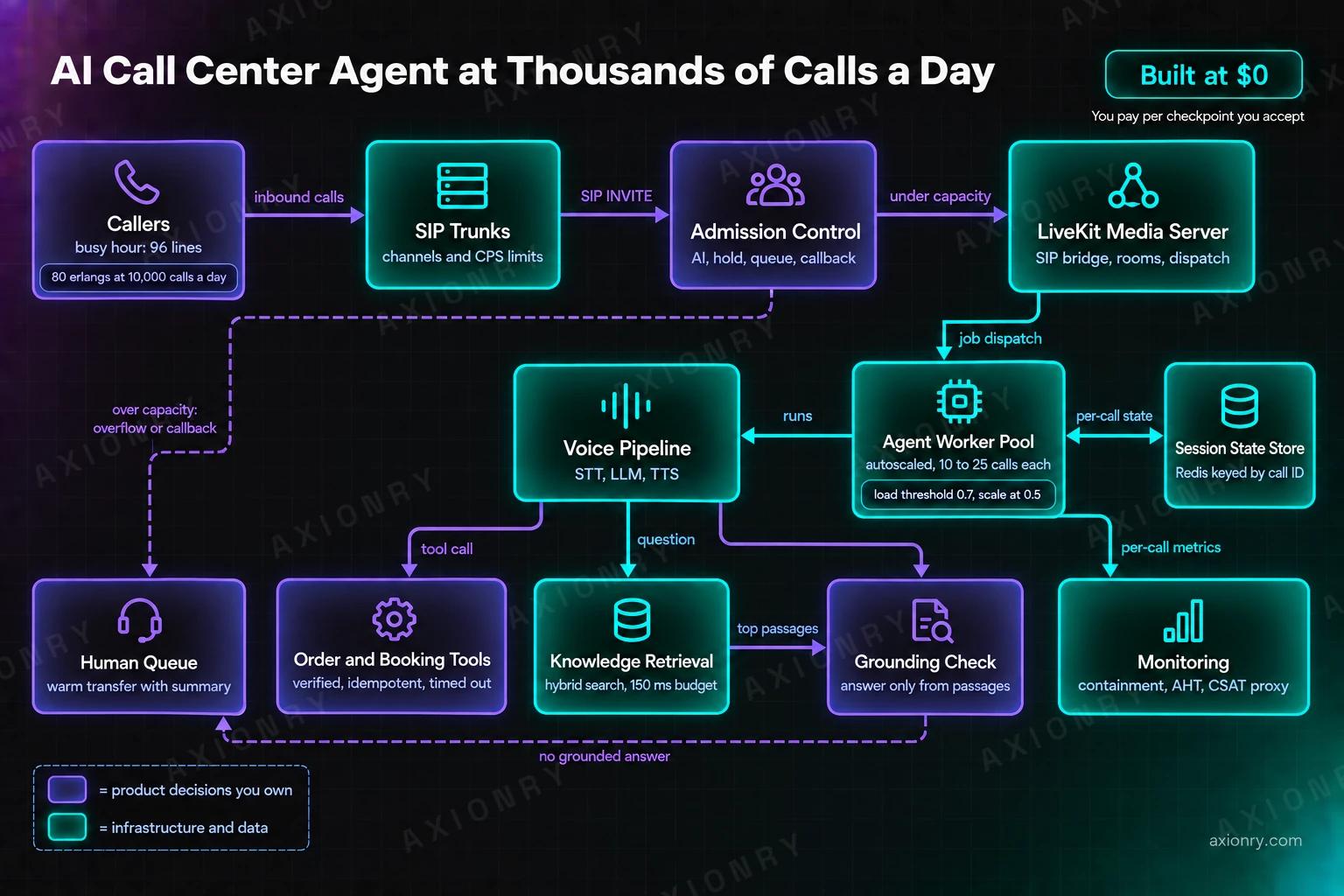
- Size for the busy hour, not the day: 10,000 calls a day with 12% in the peak hour is 80 simultaneous calls on average and 96 channels to keep blocking under 1%. Every layer (SIP trunk, agent workers, STT, TTS, LLM rate limits) needs that number confirmed in writing.
- Ground every answer in retrieved passages inside a 150 millisecond retrieval budget, and hand the caller to a person with a summary when nothing relevant comes back. Gartner found only 14% of service issues are fully resolved in self-service today, so plan year one at 40% containment, not 80%.
SIP trunks from Telnyx or Twilio, numbers, inbound channels or per-minute billing, and the carrier's concurrency and calls-per-second limits.
ceiling: channelsDecides at the SIP edge whether a call gets the AI, a short hold, the human queue or a callback offer, based on live capacity.
ceiling: your policyLiveKit's SIP service and media server bridge each call into a room and dispatch a job to an agent worker.
ceiling: sessionsStateless processes, one job per call, 10 to 25 calls per 4-core server, autoscaled on CPU and drained on deploy.
ceiling: serversStreaming STT, an LLM and TTS, each a vendor account with its own concurrency tier and rate limits.
ceiling: vendor tiersHybrid retrieval over your knowledge base, a grounding gate, and order, booking and account tools behind identity checks.
ceiling: latency budgetWarm transfer with a summary, a callback queue, and dashboards for containment, handle time and a CSAT proxy.
ceiling: staffed seatsWhat does an AI call center agent do, and what is it worth?
It answers every call on the first ring, at any hour, and resolves the routine majority itself: order status, bookings and changes, returns, account questions and policy answers from your knowledge base. Everything else goes to a person with a summary. The value is handle time you stop paying for and queues that stop forming.
Start with what a human call costs. The BLS puts 2025 median pay for US customer service representatives at $21.53 an hour across 2.67 million jobs (BLS), and wages are 70% of employer compensation cost (BLS ECEC), so a loaded hour is about $30.76. If 70% of paid time is spent handling calls, my assumption for breaks, training and idle time, a handled minute costs $0.73 and a six-minute call $4.39, before supervisors, software, seats and telephony.
Then the limit. Gartner surveyed 5,728 customers in December 2023 and found only 14% of service issues were fully resolved in self-service, with 43% of failures caused by customers not finding relevant content (Gartner, 2024). Gartner also predicts that by 2029 agentic AI will resolve 80% of common issues without a human, cutting operating costs by 30% (Gartner, 2025). Both can be true. The distance between them is knowledge base quality and access to your systems, which is what the rest of this post is about.
This is a reference design, not a case study. I have not run a support call centre. I have run voice AI in production at about 2.5 cents a minute on a custom LiveKit stack, and I built AccioMatrix, an AI assessment and interview platform now serving 20+ enterprise clients; the concurrency, latency and cost problems are the same even where the conversations differ. For the text version of this system, with the confidence gate in detail, read how to build an AI customer support agent.
How many calls can an AI phone agent handle at the same time?
As many as its smallest capacity ceiling allows, sized for the busy hour. At 10,000 calls a day, four minutes a call and 12% of calls in the peak hour, you carry 80 calls at once on average and need about 96 channels to keep the chance of a caller finding every line busy under 1%.
The arithmetic is Little's law and Erlang B, the same maths telephone networks have used for a century. Busy-hour calls times average duration gives simultaneous calls: 1,200 calls at four minutes is 4,800 call-minutes in 60 minutes, or 80 erlangs. Calls do not arrive evenly, so Erlang B gives the lines you need for a target blocking rate: 96 for 1%, 106 for 0.1%. At 1,000 calls a day the same method gives 8 erlangs and 15 channels. The 12% busy-hour share is my assumption; take yours from last quarter's call logs, because it moves the answer more than any other input.
Then find the ceiling at every layer, because each is a separate contract. Deepgram publishes up to 150 concurrent streaming speech-to-text connections and 45 text-to-speech connections on pay-as-you-go, and 225 and 60 on Growth (Deepgram pricing). LiveKit Cloud's Scale plan allows up to 600 concurrent agent sessions but starts at 50, with 50 concurrent connections to its inference service (LiveKit pricing). Telnyx starts new accounts at 2 concurrent outbound calls and 10 once verified (Telnyx), which matters for callbacks; inbound is elastic or bought as channels at $8 to $12 a month each.
The LLM is the ceiling people forget. At 96 simultaneous calls and four model turns a minute you send about 384 requests and 960,000 uncached input tokens a minute at peak. Providers cap requests and tokens per minute per model; Anthropic counts only uncached input toward its input-token limit on most models, so prompt caching raises your ceiling as well as cutting the bill (Anthropic rate limits). Get every limit raised in writing before launch week, because hitting one does not throw a clean error. The call connects and the caller hears silence.
| Input or ceiling | 1,000 calls a day | 10,000 calls a day | Source or assumption |
|---|---|---|---|
| Busy-hour share of daily calls | 12% (120 calls) | 12% (1,200 calls) | Assumption: measure yours |
| Average AI call length | 4 minutes | 4 minutes | Assumption |
| Average simultaneous calls in the busy hour | 8 | 80 | Little's law: calls x minutes / 60 |
| Channels for 1% blocking | 15 | 96 | Erlang B |
| Agent servers at 15 calls each, plus one spare | 2 | 8 | LiveKit: 10 to 25 calls per 4-core, 8 GB server |
| Agent compute, always on | $257 a month | $1,028 a month | c7i.xlarge at $0.1785 an hour |
| LLM requests a minute at full provisioned load | about 60 | about 384 | 4 turns a minute per call |
| Deepgram TTS streams (45 pay-as-you-go, 60 Growth) | fits | exceeds both tiers: enterprise or second vendor | deepgram.com/pricing |
What does the architecture look like at thousands of calls a day?
Twelve boxes. Calls arrive through SIP trunks and an admission controller, LiveKit bridges each into a room and dispatches it to a stateless agent worker, and the worker runs the voice pipeline against your knowledge base and business tools. Session state lives in a store outside the worker. People, callbacks and monitoring sit at the edges.
The load-bearing decision is that workers hold nothing that matters. LiveKit runs each job in its own process, so a crashed job leaves other calls on the server alone, but a crashed server drops every call on it (LiveKit deployments). So conversation state (the verified customer, the order under discussion, tool results, a turn log) is written to Redis or Postgres by call ID after every turn. A caller who drops and rings back within ten minutes hears 'we were checking order 4471', and a worker crash costs one call, not a thread of lost context.
Admission control is a small service with a large job. It knows live session counts and every vendor ceiling, and for each new SIP INVITE it decides: AI now, a short hold for the next free slot, the human queue, or a callback offer. Without it, the caller who arrives when the smallest ceiling is full gets whatever that vendor does under overload, which is often silence. The same service runs priority lanes, such as sending anyone who called twice in the last hour straight to a person.
The rest is familiar. Telephony and trunks are covered in LiveKit SIP trunking with Twilio vs Telnyx, and the turn budget the pipeline must hit is in the voice AI latency budget. The two parts specific to a call centre at volume, retrieval and tools, get their own sections below.
type Ceilings = { sessions: number; stt: number; tts: number; llmRpm: number };
type Live = { aiCalls: number; held: number; llmRpmNow: number; humanQueue: number; humansFree: number };

type Route = "human_now" | "ai_now" | "hold_then_ai" | "human_queue" | "offer_callback";

// Trunk channels are sized above AI capacity plus hold and queue slots,
// so every caller can at least be answered with a callback offer.
export function admit(live: Live, cap: Ceilings, repeatCaller: boolean): Route {
  // AI capacity is the smallest AI-side ceiling, minus a margin for calls still connecting
  const aiCap = Math.min(cap.sessions, cap.stt, cap.tts) - 2;
  const llmHot = live.llmRpmNow > cap.llmRpm * 0.85;

  if (repeatCaller && live.humansFree > 0) return "human_now"; // second call inside an hour
  if (live.aiCalls < aiCap && !llmHot) return "ai_now";
  if (live.held < 5) return "hold_then_ai";                    // 20 s maximum, one spoken sentence
  if (live.humanQueue < 10) return "human_queue";
  return "offer_callback";                                      // never ring out, never silence
}How do you autoscale voice agent workers without dropping calls?
Scale out early and scale in slowly. Workers stop taking jobs above a load threshold, so the autoscaler must add servers before they reach it, and a server being removed must finish its calls first, which can take ten minutes or more. Get either wrong and you drop live calls at the busiest moment of the day.
LiveKit's documented defaults make this concrete. A worker reports load as CPU utilisation and stops accepting jobs at a load_threshold of 0.7; the docs recommend scaling at a lower value, 0.5 for a 0.7 threshold, with short scale-up stabilisation because voice spikes tend to persist. The sizing rule is 4 cores and 8 GB per server for 10 to 25 concurrent calls, and in LiveKit's own load test 30 agents on one such machine peaked at about 3.8 cores and 2.8 GB (LiveKit deployments). Use compute-optimised instances; burstable ones throttle when the queue is longest.
Draining is what bites on deploy day. Workers stop accepting jobs on SIGTERM and let running calls finish, and LiveKit suggests voice apps may need a grace period of ten minutes or more, which in Kubernetes is terminationGracePeriodSeconds. Set it above your 99th percentile call length, deploy in small batches outside the busy hour, and alert on any call whose disconnect reason is a worker shutdown. A deploy that drops fifty conversations at 11am is the incident that ends an AI call-centre pilot.
Keep a warm floor. Scaling from zero makes a caller wait while a container starts and models load, so hold one idle server per region above the current peak and load static assets (the retrieval index, prompts, voice settings) in the worker's prewarm step. The compute is cheap: eight c7i.xlarge servers at $0.1785 an hour, always on, is $1,028 a month, about $0.0009 a minute at 10,000 calls a day.
- Autoscale at 0.5 CPU when workers stop taking jobs at 0.7LiveKit's documented default threshold and recommendation
- Short scale-up stabilisation, long scale-down stabilisationVoice spikes persist; draining workers take minutes to leave
- Grace period above your 99th percentile call lengthLiveKit suggests ten minutes or more for voice apps
- Compute-optimised instances, never burstable ones
- One warm server above peak in every regionA cold start is heard as silence
- Call state written after every turn, keyed by call IDA crash loses one call, not the conversation
- Deploys batched outside the busy hour, with a rollback flagThe only item that needs a person on call
How do you connect a voice agent to your knowledge base without slowing it down?
Search the moment the caller finishes speaking, give retrieval about 150 milliseconds at the 95th percentile, and answer only from what comes back. If nothing relevant comes back, the agent offers to connect the caller to someone who can help instead of improvising. Speed comes from preparation at ingestion, not from a faster model.
Ingestion decides quality. Pull the help centre, policy pages, product catalogue and your agents' saved replies, and chunk by heading into self-contained units of a few hundred tokens that each answer one question; a paragraph that says 'see above' is useless on a call. Store source, owner, product version and review date on every chunk, and re-index on publish, not nightly. Rewrite long documents into spoken answers where it matters: 'You can return unworn items within 30 days, and we email a prepaid label' works on the phone, and a twelve-clause returns policy does not.
At query time, run hybrid keyword and vector search in Postgres with pgvector until you measure a reason not to, filter by product and locale, and take the top four to six passages. Run it when the turn detector commits and inject the results with LiveKit's on_user_turn_completed hook before the model runs; for anything slower, the same docs show a spoken status update after a short delay (LiveKit external data). Skip a reranker unless you measure a gain, since it adds a network hop to every turn. The full retrieval design is in RAG over private documents.
Grounding is a gate, not a hope. The model receives passages with IDs and must emit the IDs it used in a hidden field before the spoken answer; if the field is empty or names a passage that was not retrieved, the worker swaps in a handover line before any audio plays. Low retrieval scores, deny-listed topics (legal threats, medical questions, refunds above a limit) and a second 'that's not what I asked' also route to a person with a summary. It is the support-agent confidence gate, adapted to a medium where you cannot show a citation.
- 1Caller finishes the question0 ms
The turn detector commits and the final transcript is ready.
- 2Hybrid searchbudget 150 ms at p95
Keyword plus vector search in pgvector, filtered by product and locale, top four to six passages with IDs.
- 3Model turn with passagesbudget 250 ms to first token
Passage IDs first in a hidden field, then the spoken answer. No ID, no answer.
- 4Grounding gatea few ms
IDs exist in this turn's results, the retrieval score clears the threshold, the topic is not deny-listed. Otherwise a handover line.
- 5Speak and logstreamed
Stream the answer to TTS and log the passage IDs with the turn for QA.
- 6Slow pathafter about 500 ms
If search or a tool runs long, say 'let me check that' so the caller never hears silence.
How should the agent call order, booking and account systems?
Through a few narrow tools, each with a timeout, an idempotency key for writes and an identity check before anything account-specific. Read tools answer questions such as where an order is; write tools change a booking or start a return only after the caller confirms a read-back. The agent never holds a general database credential.
Identity comes first. Before a tool returns anything personal, verify the caller with the phone number on file plus something they know (order number, postcode or date of birth), and use a one-time code by SMS for anything that moves money or changes a delivery address. Store the verified customer ID in the call state and have tools read it from there, never from the model's arguments. That one rule stops a caller from talking the agent into reading out someone else's order.
Then design tools for a voice turn. Results are short and speakable ('Out for delivery, arriving between 2 and 4pm'), not a 40-field JSON object. Reads time out at around 1.5 seconds, and the agent says what it is doing while it waits. Writes follow read-back and confirmation, carry an idempotency key built from the call ID and the arguments, and return a reference number the agent reads out. If your systems already sit behind MCP servers, the gateway pattern in MCP in production applies unchanged.
Start with three or four tools that match your top intents, typically order status, booking changes, returns and account questions such as balance or plan. Measure which intents still reach people, and add tools in that order. Large refunds, cancellations with retention offers, formal complaints and anything legal stay with people, not because a model cannot phrase them, but because each is a decision your company should make on purpose.
What happens when calls spike beyond capacity?
Admission control picks, in order: the AI now, a short hold for the next free slot, the human queue, or a callback offer. What must never happen is a call that rings out or connects to silence. Agree the order and the time limits with whoever owns the phone line, and load-test at 1.5 times your forecast peak.
Many peaks are predictable: Monday mornings, the day after a billing run, a delivery delay, a recall. Feed known events into the forecast and scale before them, because autoscaling reacts in minutes and a billing run lands in seconds. For the unpredictable ones, the callback offer is the release valve: 'All our lines are busy; I can call you back within 30 minutes on this number' costs one sentence and moves a call from the peak into the trough. Callbacks the caller asked for still run inside permitted hours.
Degrade in a planned order when a dependency struggles. If the primary LLM starts returning rate-limit errors, fail over to a second model or provider that was configured and tested in advance, not discovered mid-incident. If the TTS vendor slows, switch voices. Turn off optional work first: sentiment scoring, rerankers, long summaries. Callers should notice a slightly plainer agent, not a broken one.
People remain the overflow and the escape hatch. Staff a human queue sized for your escalation rate plus a peak buffer, and attach the AI's summary to every transfer so nobody asks the caller to repeat an order number. For that queue, the Erlang C staffing maths you already use still applies; the AI changes the arrival rate, not the method.
One spoken sentence, not music. Most short peaks clear this way.
A repeat call is evidence the last answer failed. Do not repeat it.
Queue position and expected wait spoken up front.
The scheduler dials back as capacity returns, oldest first, inside permitted hours.
A recorded message with alternatives. Never ring out, never answer into silence.
Which metrics matter for an AI call center: containment, handle time or CSAT?
All three, defined carefully. Containment counts calls resolved without a person and not repeated within seven days; handle time is measured separately for the AI and human legs; CSAT comes from a one-question survey on a sample plus a model scoring every transcript. Add cost per resolved call and 95th percentile turn latency, and alert on rates.
Containment is the easiest metric to flatter. A caller who hangs up in frustration was not contained, and neither was one who calls back an hour later. Count a call as contained only if it ended without transfer, carried an explicit resolution signal (the caller confirmed, or the tool action succeeded) and had no repeat call from the same number within seven days. Track it per intent: 70% on order status and 20% on billing disputes average to a number that describes neither.
Handle time needs two numbers. The AI leg's average handle time drives cost and concurrency; the human leg drives staffing, and a good summary should shorten it. Compare human handle time on transferred calls against a pre-launch baseline with care, because the AI now sends people only the harder calls, and their average will rise even when the agent is helping.
For satisfaction, send one SMS question after a sample of calls ('Did we solve your problem? Reply Y or N') and pair it with a transcript classifier that scores every call for resolution and frustration. The survey is ground truth for a few percent of calls; the classifier covers the rest and is recalibrated against the survey monthly. Watch cost per resolved call rather than cost per minute, since a cheaper minute that resolves less is not cheaper.
| Definition | Alert when | Why it matters | |
|---|---|---|---|
| Containment | No transfer, a resolution signal, no repeat call within 7 days | An intent drops 5 points week on week | The business case rests on it |
| Repeat-call rate | Same number calls again within 7 days | Rises above the pre-launch baseline | Catches false containment |
| AI handle time | Answer to hang-up on AI-only calls | p95 grows 30% | Drives cost and concurrency |
| Human handle time on transfers | Transfer to wrap-up | Rises without a change in call mix | Measures summary quality |
| CSAT proxy | SMS yes or no on a sample, plus a transcript classifier | The yes rate falls 5 points | The caller's view |
| Turn latency p95 | End of speech to first audio | Above 1,000 ms | The first thing callers notice |
| Cost per resolved call | All spend divided by resolved calls | Rises while volume is flat | The number finance sees |
What does an AI call center cost at 1,000 and 10,000 calls a day?
If the agent talks to every caller for four minutes at 2.5 cents a minute, the minutes cost $3,000 a month at 1,000 calls a day and $30,000 at 10,000. The totals are dominated by the human remainder: about $74,000 and $744,000 a month for a hybrid at 40% containment, against $132,000 and $1.32 million human-only.
The 2.5 cents is the production figure I plan with, and list prices land close to it. Per minute of an inbound call: Telnyx inbound local $0.0032, LiveKit's SIP fee on Scale $0.003, xAI speech-to-text $0.0033, xAI text-to-speech $0.0045 (the agent speaking half the minute at $0.009), Claude Haiku 4.5 with retrieval $0.0136 (four turns a minute, each with 5,000 cached, 2,500 uncached and 80 output tokens), recording $0.002 and compute $0.0002: $0.0298. With Gemini 3.1 Flash-Lite at $0.25 and $1.50 per million tokens, the model line falls to $0.0035 and the minute to $0.0197 (Gemini pricing). A toll-free number adds about 1.2 cents, since Telnyx lists toll-free inbound from $0.015.
The table assumes a six-minute human call at $0.73 a minute (the BLS-based figure above), AI calls of four minutes when contained and 1.5 minutes before a transfer, and 5.5 minutes of human time on transferred calls because the summary saves the caller repeating themselves. Hybrid is 40% containment and AI-first is 70%. It is labour only, 30 days a month, with no build cost, supervisors or seats. On a platform at Retell's $0.11 default the AI line is 4.4 times larger, which matters far less than containment. Price your version in the AI product cost estimator or the voice AI cost calculator.
If you want this built with the capacity plan, admission control and grounding gate in place from the first call, that is voice AI development, with voice agents from $12,000. It is built at $0: the work is split into checkpoints with acceptance criteria agreed before work starts, and each is invoiced only after you have seen it and accepted it.
| Volume and model | AI minutes a month | AI cost at 2.5 cents | Human labour | Total a month | Per call |
|---|---|---|---|---|---|
| 1,000 a day, human-only | 0 | $0 | $131,816 | $131,816 | $4.39 |
| 1,000 a day, hybrid (40% contained) | 75,000 | $1,875 | $72,499 | $74,374 | $2.48 |
| 1,000 a day, AI-first (70% contained) | 97,500 | $2,438 | $36,249 | $38,687 | $1.29 |
| 10,000 a day, human-only | 0 | $0 | $1,318,163 | $1,318,163 | $4.39 |
| 10,000 a day, hybrid (40% contained) | 750,000 | $18,750 | $724,990 | $743,740 | $2.48 |
| 10,000 a day, AI-first (70% contained) | 975,000 | $24,375 | $362,495 | $386,870 | $1.29 |
AI call center agents: common questions
→How many calls can an AI voice agent handle at once?
As many as the smallest ceiling in the stack: SIP channels, media sessions, agent servers, STT and TTS vendor concurrency, and LLM rate limits. For 10,000 calls a day at four minutes each with 12% in the busy hour, plan for 96 simultaneous calls to keep blocking under 1%. LiveKit suggests 10 to 25 calls per 4-core, 8 GB server.
→What containment rate should an AI call center agent reach?
Plan year one at about 40% and treat anything more as upside. Gartner found only 14% of service issues are fully resolved in self-service today, while predicting that agentic AI will resolve 80% of common issues by 2029. Knowledge base quality and tool access close the gap. Measure containment per intent and exclude calls repeated within seven days.
→How do you stop an AI phone agent giving wrong answers from the knowledge base?
Ground every answer in retrieved passages. The model must return the IDs of the passages it used before the spoken answer, a deterministic gate checks them, and low retrieval scores or deny-listed topics go to a person with a summary. Rewrite long documents into short spoken answers at ingestion, and re-index when content is published, not nightly.
→How much does an AI call center agent cost per minute?
About 2 to 3 cents a minute on a self-built LiveKit stack at September 2026 list prices, depending mainly on the model: roughly $0.030 with Claude Haiku 4.5 and $0.020 with Gemini 3.1 Flash-Lite on a local number. Toll-free adds about 1.2 cents. Managed platforms such as Retell start at $0.11 a minute for their default configuration.
→What happens to callers when the AI system is at capacity?
Admission control decides before the call is answered: a short hold for the next free slot, straight to a person for repeat callers, the human queue with a summary, or a callback offer when every queue is full. The rule is that a call never rings out and never connects to silence. Load-test it at 1.5 times your forecast peak.
Open the article in your assistant with one click and ask it how this applies to your product.